
gScholar for Google Apps & Chrome
About gScholar for Google Apps & Chrome
If you do not have gScholar for Google Apps and Chrome installed, please visit our Google Apps Marketplace page at http://www.google.com/enterprise/marketplace/viewListing?productListingId=3021+14712923902958576433&category=&query=gscholar
Promevo's new TEACHER DASHBOARD for Google Apps goes beyond Chromebook collaboration offering the latest in geo-location, student tracking and asset mgmt technology!
Robust teacher/student interaction platform
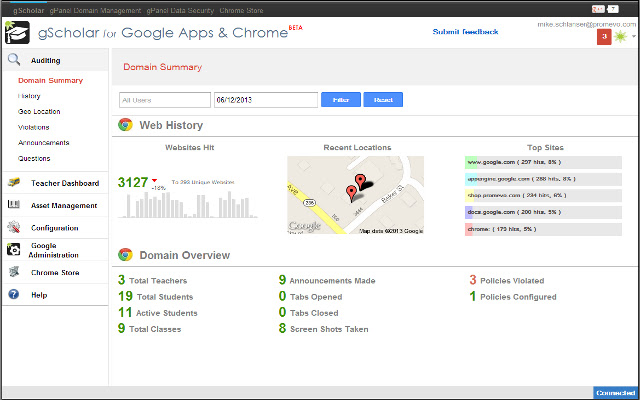
Chrome tracking geo-location, web history and more
Flexible and simple asset management
TEACHER DASHBOARD
-Accelerate interaction with an intuitive dashboard that provides a bird’s eye view of your class
-Kickstart collaboration by creating/granting access to drive folders for your entire class
-Track engagement by viewing snapshots of student’s screens
-Minimize distractions by closing students’ web pages remotely
-Encourage interaction by pushing selected website urls directly to students
-Limit interruptions with the on-demand question queue
GEO LOCATOR
-Pinpoint the location of all your Chromebooks on Google maps
-Identify geographical boundaries using point and click geo-fencing capabilities
-Receive notifications when any Chromebook has been taken outside of your established boundary
ASSET MANAGER
-Track actionable asset information with flexible customization such as: assigning users, device status and more to any asset
-Preserve asset integrity over their lifetime with written/visual documentation for all your Chromebooks, phones, books, etc.
-Generate QR codes that can be placed on assets for easy tracking with any mobile device
AUDIT AGENT
-Identify cheating by tracking full web browsing history
-Track all communication between teachers and students
-Audit all actions taken in gScholar with complete admin logs
-Track all user website violations with violation logs
ALERTS ENGINE
-Receive instant notification of violations to your established web browsing and geographical boundary policy
Why Download gScholar for Google Apps & Chrome?
- ✅ Trusted by 8000+ users worldwide
- ✅ High Rating: 2.57/5 stars from 14 reviews
- ✅ Latest Version: 4 - Always up to date
- ✅ Safe & Secure: Verified by Chrome Web Store
- ✅ Free to Use: No cost required
Extension Details
Discover gScholar for Google Apps & Chrome - The Best Chrome Application for Your Browser
Looking for the perfect Chrome application to enhance your browsing experience? gScholar for Google Apps & Chrome is one of the most popular and highly-rated applications available on the Chrome Web Store, trusted by over 8000 users worldwide.
With an impressive 2.57-star rating based on 14 authentic user reviews, gScholar for Google Apps & Chrome has proven its value and reliability to the Chrome community. This application is perfect for users who want to improve their productivity, enhance their browsing security, or simply add useful functionality to their Chrome browser.
Download gScholar for Google Apps & Chrome today and join thousands of satisfied users who have already discovered the benefits of this powerful Chrome application. Installation is quick and easy - simply click the download button above to be redirected to the official Chrome Web Store where you can safely install this extension in just a few clicks.
Similar applications


