Live CSS Editor
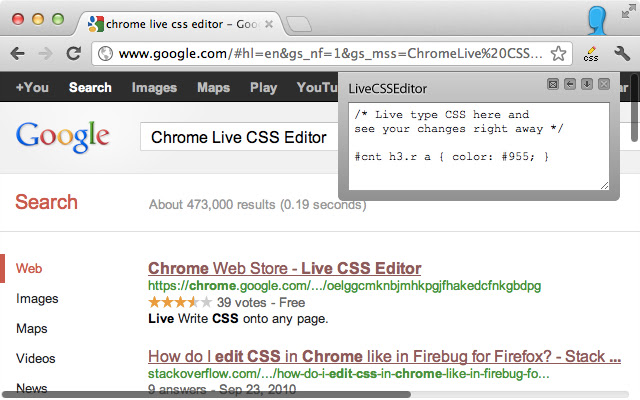
About Live CSS Editor
The extension options allow you to set a default key command to open and close the editor; turn off the warning that is shown when you close the editor; and enable or disable the automatic saving of your changes when you close the editor.
Version 1.8.0 includes the following changes:
- The ability to set a default editor size
- Warnings and error messages when trying to use the editor in places that it won't work
- Improved the CSS to make sure it isn't impacted by other page CSS
- Use the Chrome Keyboard Shortcuts instead of a custom shortcut (BREAKING CHANGE)
- Code cleanup
Version 1.7.3 is mostly a version bump for manifest 2 support. It just brings it up to support the latest versions of Chrome.
Version 1.7 includes:
- Ability to move the window left / right as well as top / bottom.
- Support for RTL pages (forces LTR on the editor)
- Support for tab spacing in the editor
- other minor bug fixes
Version 1.6 includes the following:
- You can now save styles that you create for the pages you visit. When you come back to the page, the new styles will be applied instantly.
- The editor remembers the size of the editing box on a per url basis. If you've resized it, it will be the same size the next time you open it on that url.
- Customizations are now saved per URL instead of per domain
Version 1.5 includes the following updates:
- Support for tabs in the text area
- Support for https URLs
- You can disable the warning message
- It can remember your CSS changes, even after a refresh of the page
- A keyboard command (ctrl+shift+E) can open and close the editor
- You can configure the keyboard command in the options
- The chrome icon is colorized instead of black
- Faster, smoother operation and cleaner code
- International Language Support
Please update and try it out. You can follow @livecsseditor on twitter for updates and feedback. Thanks :)
Jeremy Hubert
http://twitter.com/livecsseditor
http://twitter.com/jhubert
Why Download Live CSS Editor?
- ✅ Trusted by 30000+ users worldwide
- ✅ High Rating: 3.88/5 stars from 161 reviews
- ✅ Latest Version: 1.8.0 - Always up to date
- ✅ Safe & Secure: Verified by Chrome Web Store
- ✅ Free to Use: No cost required
Extension Details
Discover Live CSS Editor - The Best Chrome Extension for Your Browser
Looking for the perfect Chrome extension to enhance your browsing experience? Live CSS Editor is one of the most popular and highly-rated extensions available on the Chrome Web Store, trusted by over 30000 users worldwide.
With an impressive 3.88-star rating based on 161 authentic user reviews, Live CSS Editor has proven its value and reliability to the Chrome community. This extension is perfect for users who want to improve their productivity, enhance their browsing security, or simply add useful functionality to their Chrome browser.
Download Live CSS Editor today and join thousands of satisfied users who have already discovered the benefits of this powerful Chrome extension. Installation is quick and easy - simply click the download button above to be redirected to the official Chrome Web Store where you can safely install this extension in just a few clicks.
Similar extensions