Black Menu for Google™
About Black Menu for Google™
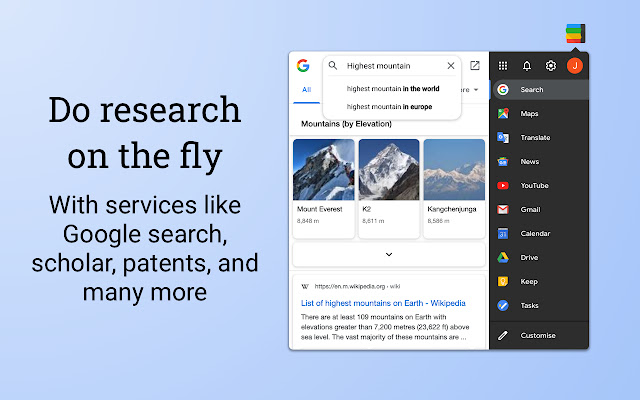
Customize the menu by pointing at ‘Add’ and dragging/clicking the services you want from a comprehensive list of services. To remove services, drag them to the right to remove them.
Access these and more with Black Menu for Google:
Google Search. Quickly search the web or switch tabs to search for images, books, news, etc.—all within the mini window.
Google+. Share the current page, or check your latest Google notifications. Navigate all of Google+ as you would on a mobile device.
Google Translate. Type or paste text into the box to get a quick translation for that comment you received in a foreign language. View your translate history and save your favorite ones.
Google Maps. Find the next restaurant to try out by using the mini map that has search, Street View, and layers for satellite, traffic, public transport and cycling.
YouTube. Watch popular videos or those recommended to you. Do a search and filter the results to find that one video you wanted to share. Sign in to find useful shortcuts at the bottom.
Google News. Read top news from your locale or any country you choose. Also browse sections like World, Business, Sci/Tech and Entertainment. Use search to find news about any topic.
Gmail. Get a full-featured Gmail inbox to check or send mail from. Reply to colleagues, edit labels, forward emails, or archive them—do almost everything Gmail can do right from the menu.
Google Drive. Browse folders or search for files in a nice familiar layout. View your documents as a list or see images in a grid view. Click the add button to upload files or make new ones.
Google Calendar. See your upcoming events summarized in a list. Toggle which calendars you’d like to see from the side drawer or just search for specific events.
Google Keep. Create lists, reminders, or paste snippets from the web. All your notes are here, including archived ones. Organize and rearrange them as you want.
Apps page. Access shortcuts to common (and obscure) Google websites like Google Contacts, Google Groups, Google Art Project, Google Follow Your World and 450+ more!
Right click the Black Menu icon to send me feedback, suggestions, or to report a problem.
Why Download Black Menu for Google™?
- ✅ Trusted by 300000+ users worldwide
- ✅ High Rating: 4.66/5 stars from 3053 reviews
- ✅ Latest Version: 24.4.0 - Always up to date
- ✅ Safe & Secure: Verified by Chrome Web Store
- ✅ Free to Use: No cost required
Extension Details
Discover Black Menu for Google™ - The Best Chrome Extension for Your Browser
Looking for the perfect Chrome extension to enhance your browsing experience? Black Menu for Google™ is one of the most popular and highly-rated extensions available on the Chrome Web Store, trusted by over 300000 users worldwide.
With an impressive 4.66-star rating based on 3053 authentic user reviews, Black Menu for Google™ has proven its value and reliability to the Chrome community. This extension is perfect for users who want to improve their productivity, enhance their browsing security, or simply add useful functionality to their Chrome browser.
Download Black Menu for Google™ today and join thousands of satisfied users who have already discovered the benefits of this powerful Chrome extension. Installation is quick and easy - simply click the download button above to be redirected to the official Chrome Web Store where you can safely install this extension in just a few clicks.
Similar extensions