How Log Ago?
About How Log Ago?
Simply install and watch the (Meraki) magic happen!
Clicking the page will refresh the times, or add them if they are missing.
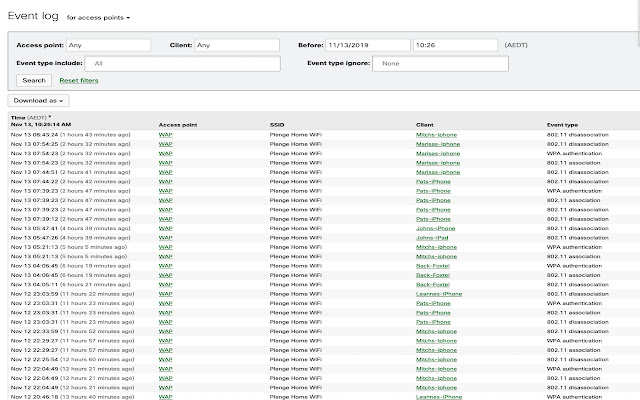
>> "Network-wide > Event log" page:
- Display network local time zone on the header of Time column;
- Display how long ago that event occurred
Still in early release and only provides basic functionality.
We are not programmers, expect a lot of issues and kindly provide us feedback if you find something odd (we are looking for Time Zones that are not working as expected).
Patrick Plenge & Eduardo Azevedo
Current issues:
- Times will sometimes not be automatically displayed, requires refresh by clicking.
- Times will never automatically refresh when clicking 'newer / older'. Requires clicking.
Change-log and Bug fixes:
Version 1.1.6
- Fixed an issue that causes network time not to display when there are <30 events
Version 1.1.5
- Updated permissions to be less ambiguous
- Remove console logging
- After 24 hours the time will be reflected with 'days' instead of hours. Keeping '0 hours' because i like it better than without it.
- Fixed an issue that would cause minutes to accumulate instead of ticking over to the hours (from 1.0.1).
Version 1.1.4
- Fixed an issue that caused the month of December to become undefined
Version 1.1.0 (Official release)
- Removed ability to show/hide event time and network time
- Changed the UI
- Added feedback button
- Fixed an issue where times would disappear when filtering
- Clicking anywhere will refresh the times
- Reduced amount of loading errors
- Only allow script to run on event log page
Known bugs and issues:
- Clicking newer & older does not auto-refresh time stats. Requires manual refresh - but can now be done by clicking on the page
- Events over 99 hours are incorrectly formatted
- Timezones with the same abbreviation can be displayed incorrectly (IST)
Version Beta 1.0.1 (Second release) (Deprecated)
- Fixed an issue that would display incorrect network times
- Fixed an issue that did not remove previously written event and network times.
- Added new logo
- Added ability to hide and show network / event times.
- Added ability to refresh the current network time.
- Rebranded from 'Meraki Time' to 'How Log Ago'
Known bugs and issues:
- Clicking newer & older does not auto-refresh time stats. Requires manual refresh.
- Loading event log for first time does not auto-refresh. Requires manual refresh.
- Hiding and showing network time is unreliable
- Hiding and showing event time is unreliable
- Events over 99 hours are incorrectly formatted
- Timezones with the same abbreviation can be displayed incorrectly (IST)
Why Download How Log Ago??
- ✅ Trusted by 195+ users worldwide
- ✅ High Rating: /5 stars from reviews
- ✅ Latest Version: 1.1.6 - Always up to date
- ✅ Safe & Secure: Verified by Chrome Web Store
- ✅ Free to Use: No cost required
Extension Details
Discover How Log Ago? - The Best Chrome Extension for Your Browser
Looking for the perfect Chrome extension to enhance your browsing experience? How Log Ago? is one of the most popular and highly-rated extensions available on the Chrome Web Store, trusted by over 195 users worldwide.
With an impressive -star rating based on authentic user reviews, How Log Ago? has proven its value and reliability to the Chrome community. This extension is perfect for users who want to improve their productivity, enhance their browsing security, or simply add useful functionality to their Chrome browser.
Download How Log Ago? today and join thousands of satisfied users who have already discovered the benefits of this powerful Chrome extension. Installation is quick and easy - simply click the download button above to be redirected to the official Chrome Web Store where you can safely install this extension in just a few clicks.
Similar extensions