DRAWWWERS Bookmark Button
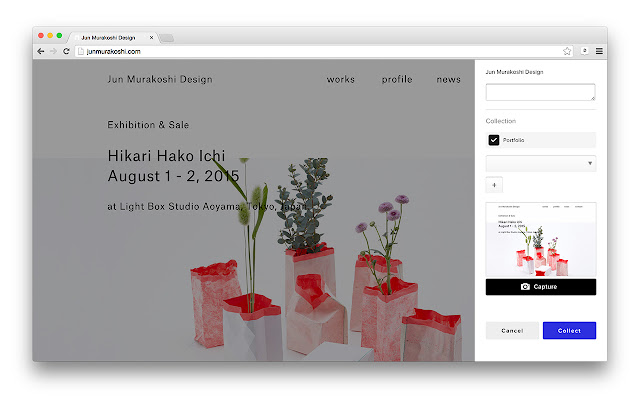
About DRAWWWERS Bookmark Button
RELEASE NOTE
----------------
v1.2.0 (2020.6.29)
- Add "Adjust window" feature.
v1.1.2.3 (2020.6.9)
- Fix errors
v1.1.2.2 (2020.6.5)
- Republish (same as v1.1.2)
v1.1.2.1 (2020.5.31)
- Re-revert to 1.0.9
v1.1.2 (2020.5.30)
- Fix sign in screen
- Fix cannot save specific website
v1.1.1.3 (2019.4.3)
- Re-revert to 1.0.9
v1.1.1.2 (2019.4.1)
- Fix problems
v1.1.1.1 (2019.3.29)
- Revert to 1.0.9
v1.1.1 (2019.3.29)
- Fix icon error
v1.1.0 (2019.3.28)
- Update sign in screen
v1.0.9 (2018.11.8)
- Fix errors
v1.0.8 (2018.11.2)
- Add placeholders on UI
v1.0.7 (2018.6.20)
- Fix 'infinite loading' problem at startup
v1.0.6 (2018.4.2)
- Fix 'Sign in with Facebook' problem
v1.0.5 (2018.1.29)
- Add GET parameter when open DRAWWWERS about page
v1.0.4 (2017.10.14)
- Open DRAWWWERS about page after install
v1.0.3 (2017.9.22)
- Fix scrolling problem while taking a screenshot on Chrome 61
v1.0.2 (2017.9.3)
- Fix fatal errors on v1.0.0
v1.0.1 (2017.8.8)
This version is same as v0.5.7. Because v1.0.0 contains fatal errors.
v1.0.0 (2017.8.8)
- Some improvements while taking screenshots
- Some improvements of notification
- Modest UI after "Collect" action
- High resolution images (for retina display)
- Change "Remove" icon
and more small improvements.
v0.5.7 (2017.5.24)
- Dismiss none HTML resources
v0.5.6 (2016.12.16)
- Allow push "Collect" button without enter key pressed when creating new collection
- Fix "Collect" and "Cancel" button's position to bottom on narrow screens
v0.5.5 (missing release)
v0.5.4 (2016.8.8)
- Fix issue that extension was not showed after extension button pushed in specific site.
v0.5.3 (2016.7.16)
- Fix screenshot issue (hide header element while taking screenshots).
v0.5.2 (2016.7.9)
- Add update notification feature
v0.5.1 (2016.7.4)
- Fix issue that extension does not disappear after save bookmark
v0.5.0 (2016.6.18)
- SSL compatible
v0.4.7 (2016.6.18)
- Reverse host to 'drawwwers.com'
v0.4.6 (2016.6.18)
- Change host to 'www.drawwwers.com'
v0.4.5 (2016.6.17)
- Fixed react warnings in console
v0.4.4 (2016.6.17)
- Fixed a bug that was not able to create a new collection
- Fixed a bug that collection did not appear on the list when you deselected
v0.4.3 (2016.5.18)
- Fix login error with username
- Style improvement
v0.4.2 (2016.5.13)
- Fix error while updating screenshot
v0.4.1 (2016.5.13)
- [temporally fix] compatible multiple tabs and windows
v0.4.0 (2016.5.12)
- Fix script and stylesheet pollution from HTML document
- Screenshot improvement (compatible with other extensions)
- Viewport Dimensions (0.0.7)
- Window Resizer (1.9.1.5)
Why Download DRAWWWERS Bookmark Button?
- ✅ Trusted by 440+ users worldwide
- ✅ High Rating: 5/5 stars from 5 reviews
- ✅ Latest Version: 1.2.0 - Always up to date
- ✅ Safe & Secure: Verified by Chrome Web Store
- ✅ Free to Use: No cost required
Extension Details
Discover DRAWWWERS Bookmark Button - The Best Chrome Extension for Your Browser
Looking for the perfect Chrome extension to enhance your browsing experience? DRAWWWERS Bookmark Button is one of the most popular and highly-rated extensions available on the Chrome Web Store, trusted by over 440 users worldwide.
With an impressive 5-star rating based on 5 authentic user reviews, DRAWWWERS Bookmark Button has proven its value and reliability to the Chrome community. This extension is perfect for users who want to improve their productivity, enhance their browsing security, or simply add useful functionality to their Chrome browser.
Download DRAWWWERS Bookmark Button today and join thousands of satisfied users who have already discovered the benefits of this powerful Chrome extension. Installation is quick and easy - simply click the download button above to be redirected to the official Chrome Web Store where you can safely install this extension in just a few clicks.
Similar extensions