Pivotal Tracker Story Board
About Pivotal Tracker Story Board
now it complies to the new manifest 2.0 version.
v 2.1.5:
Now you can see the number of stories present in each column and also you can decide to hide/show chores, bugs and or releases.
v 2.1.3:
Added ability to buy me a coffee ;)
v 2.1.2:
If an error occurs the story board will refresh automatically after 30 seconds.
When saving the options the story board tabs will automatically refresh.
Rejected stories appear in the unstarted column.
Added link to options page and report a bug in the story board page.
v 2.1.1:
Fixed show accepted/rejected column checkbox state storage.
Added release icon.
Fixed refresh problem where after a first refresh the show only unstarted stories for current iteration setting was ignored.
v 2.1:
Added ability to show the accepted/rejected stories column for the current iteration. Accepted stories have a green background, rejected stories a red background.
N.B. If you want to request a new feature or report a bug please don't hesitate to open a new Ticket by clicking on the support & FAQ link below.
v 2.0.3:
Fixed a bug related to unscheduled stories, and added an option to select which columns to be displayed.
v 2.0.2:
Added a new checkbox in the options panel to decide if showing the unstarted stories only for the current iteration or all the unstarted stories in the backlog.
v 2.0:
This has been a major re-factor of the extension and now it isn't a page extension anymore, but a browser extension.
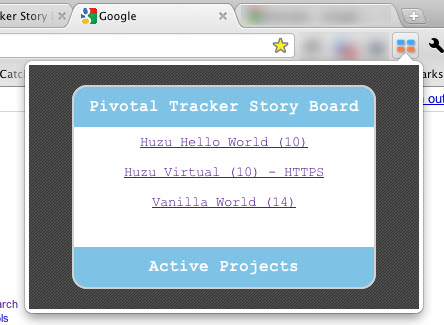
That means that you don't have to navigate to Pivotal Tracker website to open up the Story Board, you just need to click on the icon near the address bar on your Chrome browser to see a list of your projects. (If it's your first installation you still need to input your API Token in the options page , see below..)
In the list you can see the current velocity of the project and if it is using https.
What you need to do now is just click on one of the projects to open up the Story Board view.
v. 1.0.4:
Now Story Board will show only the stories in the current iteration.
v. 1.0.2 :
- Pivotal Tracker Story Board handles https connections to Pivotal Tracker.
I'm using Pivotal Tracker for one of my company projects and it's a really good product.
The only thing the software is missing is a simple and clear view of the current iteration.
This extension will give you the ability to visualize the current iteration like you would on a card wall.
Install the extension and open the options page. (on the Extensions page you'll see an Options link just after the Disable and Unistall link.)
In the options page you need to insert your Pivotal Tracker API token.
You can also customize the titles for each column, so for example you can see the "finished" story in the "Ready to Test" column.
Pivotal Tracker Story Board will also automatically update itself based on a customizable timeout.
So get a spare monitor, login onto Pivotal Tracker, launch Pivotal Tracker Story Board and keep all the team up to date on the state of the iteration!
N.B. This is not an official Pivotal Labs product.
N.B. You need to tick "Allow API access" in your project settings page and also create a API token for your user.
Why Download Pivotal Tracker Story Board?
- ✅ Trusted by 516+ users worldwide
- ✅ High Rating: 3.6/5 stars from 15 reviews
- ✅ Latest Version: 3.0.0 - Always up to date
- ✅ Safe & Secure: Verified by Chrome Web Store
- ✅ Free to Use: No cost required
Extension Details
Discover Pivotal Tracker Story Board - The Best Chrome Extension for Your Browser
Looking for the perfect Chrome extension to enhance your browsing experience? Pivotal Tracker Story Board is one of the most popular and highly-rated extensions available on the Chrome Web Store, trusted by over 516 users worldwide.
With an impressive 3.6-star rating based on 15 authentic user reviews, Pivotal Tracker Story Board has proven its value and reliability to the Chrome community. This extension is perfect for users who want to improve their productivity, enhance their browsing security, or simply add useful functionality to their Chrome browser.
Download Pivotal Tracker Story Board today and join thousands of satisfied users who have already discovered the benefits of this powerful Chrome extension. Installation is quick and easy - simply click the download button above to be redirected to the official Chrome Web Store where you can safely install this extension in just a few clicks.
Similar extensions