
Streak BigQuery Developer Tools
About Streak BigQuery Developer Tools
-------------------------------------------------------
The Streak BigQuery Developer Tools (SBDT) is a chrome extension that currently adds functionality to BigQuery (see features below) and in the future will add other tools used internally at Streak.com
BigQuery Tools
----------------------
1. Graph Results of a Query
The SBDT extension lets you graph the results of a query. The button appears next to the download as csv button. It currently only graphs the current results on screen, in a future release it will graph all results. It expects the first column to be a date and every other column after that to be a number.
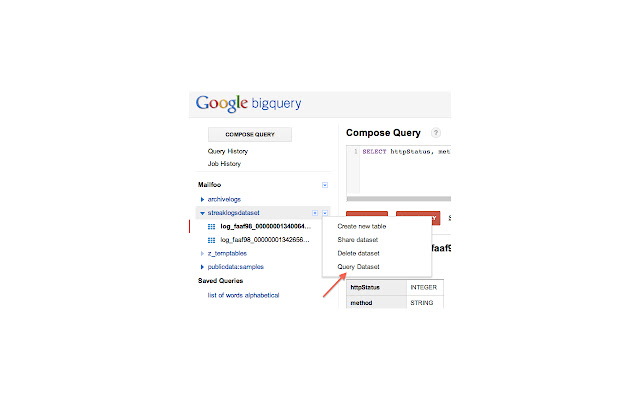
2. Query Across Datasets
Simply select "Query Dataset" and the query box will be filled in for you with all the tables in the dataset.
3.Show Cost of Each Query
Added the ability to see how much each query that you ran costs. Once the query completes, we added the cost (in US cents) next to the summary status of the query. The cost is calculated based on $0.035/GB processed.
4. Expand Multi-line Results
The SDT allows you to click on any result row and expand it to show multi-line strings. Simply click on the row number in the results table to toggle multi-line on and off.
In order to put multi-line strings into BigQuery, make sure that your line endings are '\r' and not '\n' as those aren't supported by BigQuery.
5. Automatically Convert Timestamps to Human Readable Format
AppEngine and BigQuery store timestamps as epoch time which is great for computers and computation, but not so good for a human to read. The extension automatically finds, parses and replaces epoch timestamps with a human friendly date/time rendering.
6. Insert All Columns into SELECT Statements
Sometimes you want to select every column in your query but typing each of them out manually takes time especially for tables with a large number of columns. In the schema description for a table, you'll see a new yellow field called "Add All Columns" which you can press to insert all of the column names into your query.
Why Download Streak BigQuery Developer Tools?
- ✅ Trusted by 1000+ users worldwide
- ✅ High Rating: 4.89/5 stars from 18 reviews
- ✅ Latest Version: 3.6 - Always up to date
- ✅ Safe & Secure: Verified by Chrome Web Store
- ✅ Free to Use: No cost required
Extension Details
Discover Streak BigQuery Developer Tools - The Best Chrome Extension for Your Browser
Looking for the perfect Chrome extension to enhance your browsing experience? Streak BigQuery Developer Tools is one of the most popular and highly-rated extensions available on the Chrome Web Store, trusted by over 1000 users worldwide.
With an impressive 4.89-star rating based on 18 authentic user reviews, Streak BigQuery Developer Tools has proven its value and reliability to the Chrome community. This extension is perfect for users who want to improve their productivity, enhance their browsing security, or simply add useful functionality to their Chrome browser.
Download Streak BigQuery Developer Tools today and join thousands of satisfied users who have already discovered the benefits of this powerful Chrome extension. Installation is quick and easy - simply click the download button above to be redirected to the official Chrome Web Store where you can safely install this extension in just a few clicks.
Similar extensions





