
Your Graphic Designer
About Your Graphic Designer
Release 2.9.0 - Now you can save your svg project as html format
Release 2.8.9.2 - Share image on Imgur deprecated for security reasons.
Release 2.8.9.1 - Update content security policy in manifest about level of iframe.
Release 2.8.9 - Update imgur APIs
Release 2.8.8 - Removed some permissions not required
Release 2.8.7 - Update jQuery UI with last release
=============
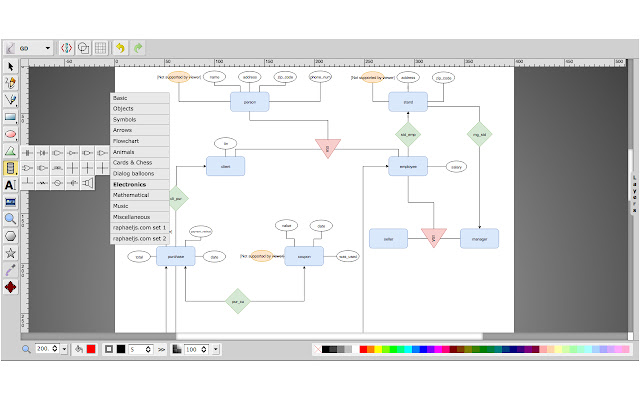
Is HTML5 vector graphics editor with following features:
* Free-hand drawing
* Lines, Polylines, Rects/Squares, Ellipses/Circles, Polygons/Curved Paths, Stylable Text
* Raster Images
* Select/move/resize/rotate
* Undo/Redo
* Color/Gradient picker
* Group/ungroup and Align
* Zoom
* Layers
* Convert Shapes to Path
* Wireframe Mode
* Save drawing to SVG
* Linear Gradient Picking
* View and Edit SVG Source
* UI Localization: العربية, Čeština, Deutsch, English, Español, فارسی, Français, Frysk, हिन्दी, हिंदी, Italiano, 日本語, Nederlands, Polski, Português (BR), Română, Русский, Slovenčina, Slovenščina, 简体中文, 繁體中文
* Resizable Canvas
* Change Background
* Draggable Dialogs
* Resizable UI (SVG icons)
* Open Local Files
* Import SVG into Drawing
* Connector lines and Arrows
* Smoother freehand paths
* Editing outside the canvas
* Add/edit Sub-paths
* Multiple path segment selection
* Support for foreign markup (MathML)
* Radial Gradients
* Configurable Options
* Eye-dropper tool
* Stroke line join and line cap
* Export as PNG, JPEG, BMP, WEBP and PDF formats
* In-group editing
* Image library (from external service in https layer) and Shape library including Electronics symbols
* Context menu
* Cut/Copy/Paste
* Gridlines, snap to grid
* Merge layers
* Duplicate layer
* Share Image on Imgur using context menu - deprecated for security reasons
* Import image in online photo editor using context menu (this feature work online using external service in https layer)
==================
Release 2.8.5 - Added button to Cloud Print as PNG format
Release 2.8.1 - Fix bug about import image in online photo editor express tool with context menu
Why Download Your Graphic Designer?
- ✅ Trusted by 10000+ users worldwide
- ✅ High Rating: 4/5 stars from 10 reviews
- ✅ Latest Version: 2.9.1 - Always up to date
- ✅ Safe & Secure: Verified by Chrome Web Store
- ✅ Free to Use: No cost required
Extension Details
Discover Your Graphic Designer - The Best Chrome Extension for Your Browser
Looking for the perfect Chrome extension to enhance your browsing experience? Your Graphic Designer is one of the most popular and highly-rated extensions available on the Chrome Web Store, trusted by over 10000 users worldwide.
With an impressive 4-star rating based on 10 authentic user reviews, Your Graphic Designer has proven its value and reliability to the Chrome community. This extension is perfect for users who want to improve their productivity, enhance their browsing security, or simply add useful functionality to their Chrome browser.
Download Your Graphic Designer today and join thousands of satisfied users who have already discovered the benefits of this powerful Chrome extension. Installation is quick and easy - simply click the download button above to be redirected to the official Chrome Web Store where you can safely install this extension in just a few clicks.
Similar extensions


