Virtual Hosts
About Virtual Hosts
Overwrite the Host HTTP header to request a specific virtual host from a remote server.
Often enough while waiting for DNS propagation or standing up a replacement site, developers edit the hosts file on their system to achieve the same effect. This extension basically does the same thing without the hassle.
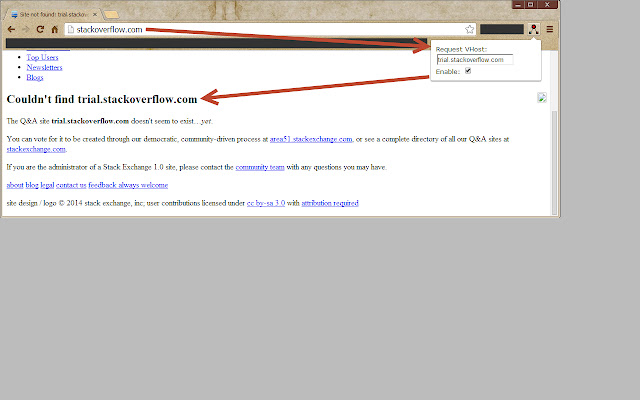
When detecting outgoing HTTP requests from your Chrome browser to the VHost Domain we redirect to the VHost IP. When detecting outgoing HTTP requests from your Chrome browser to the VHost IP, the extension simply adds a Host header containing the domain name specified in the VHost Domain. Any requests to sites other than the VHost Domain and VHost IP are ignored, so browsing other sites won't be impacted.
== HOW TO USE ==
- Enable -
Click the VHost icon in the top right and enter the desired domain name.
When a domain is present and [x] Enabled is checked, the VHost icon turns red. That means all websites will be requested with the entered domain.
- Disable -
Untick the [ ] Enabled checkbox. The icon will turn green-ish which means VHost is disabled and all websites will be requested with the regular host name.
== Source ==
I released the source code on GitHub: https://github.com/Gachl/Virtual-Hosts-Chrome-Extension
I was unable to improve this extension with more features and I saw it being used by quite a lot of people. So thank you for that! If you need any features you can find the code or a fork of someone who already implemented more stuff over on GitHub.
== THANK YOU ==
For using this extension. If you have the time to spare, please consider rating it in the Web Store.
Many thanks to mcarver (https://github.com/mcarver) for:
- Cleaning my very basic JS
- Adding request filtering
- Adding redirect
- Adding Chrome storage sync
- Making this thing better in many ways
For the next version I hope to merge Zacqarys changes (https://github.com/Zacqary/Virtual-Hosts-Chrome-Extension) to this version.
Why Download Virtual Hosts?
- ✅ Trusted by 10000+ users worldwide
- ✅ High Rating: 4.04/5 stars from 54 reviews
- ✅ Latest Version: 1.2 - Always up to date
- ✅ Safe & Secure: Verified by Chrome Web Store
- ✅ Free to Use: No cost required
Extension Details
Discover Virtual Hosts - The Best Chrome Extension for Your Browser
Looking for the perfect Chrome extension to enhance your browsing experience? Virtual Hosts is one of the most popular and highly-rated extensions available on the Chrome Web Store, trusted by over 10000 users worldwide.
With an impressive 4.04-star rating based on 54 authentic user reviews, Virtual Hosts has proven its value and reliability to the Chrome community. This extension is perfect for users who want to improve their productivity, enhance their browsing security, or simply add useful functionality to their Chrome browser.
Download Virtual Hosts today and join thousands of satisfied users who have already discovered the benefits of this powerful Chrome extension. Installation is quick and easy - simply click the download button above to be redirected to the official Chrome Web Store where you can safely install this extension in just a few clicks.
Similar extensions