CSV Export for Trello
About CSV Export for Trello
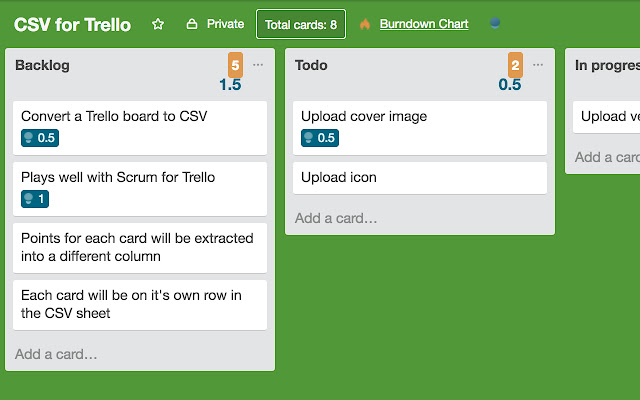
A sample csv file can be found here - https://drive.google.com/file/d/1Q9Fo17JFi_kFT40ddvvj3okxN51FoQyH/view?usp=sharing
The file was derived from this board - https://trello.com/b/oRtxPyDq/csv-for-trello
In case you want updates you can sign up for the CSV for Trello newsletter here - http://eepurl.com/db0fBn . We only send out updates when there are updates. No marketing emails etc.
To use this extension:
1. Install it
2. When you are on a Trello board, click the extension icon on the right of the address bar
3. Once the icon is clicked, a CSV file of the board will be automatically downloaded
New in version 0.12.0 (24 Sep 2020):
- Added anonymized analytics to track usage (to find out if it's worth maintaining)
New in version 0.11.2 (22 Feb 2019):
- Bugfix - Fixed bug where CSV rows stop when there is a hash in the content (mainly for Windows users)
New in version 0.11.0 (21 Jul 2018):
- Populated the 'Badges' column with the number of votes
New in version 0.10.1 (21 Jul 2018):
- Bugfix: For column ordering bug introduced in version 0.10.0.
- Bugfix: Fixed attachment column to show attachment URLs properly
New in version 0.10.0 (21 Jul 2018):
- Added a column called memberFullname that contains the full name of each member in a care
New in version 0.9.0 (9 Apr 2018):
- Updated the extension to use the new Custom Fields API**
- CSV File names now use the name of the board
**See https://blog.trello.com/trello-custom-fields-with-mobile-more-fields-api. This should work now but ping me at [email protected] if you still notice bugs.
New in version 0.8.0 (10 Nov 2017):
- Added the ability to parse data from the 'Custom Fields' power up (https://blog.trello.com/trello-custom-fields)
New in version 0.7.1 (10 Nov 2017):
- Minor bugfix with column ordering
New in version 0.7.0 (9 Nov 2017):
- Added a createdAt column to show when each card was created.
New in version 0.6.0 (15 Apr 2017):
- Changed order of columns to push unprocessed columns to the end and grouped related columns together. This should make the CSV file easier to read and use.
New in version 0.5.0:
- Processed the idMembers column to show initials instead of member ids.
Ping me if you have any suggestions / improvements. Contributors welcomed, please submit a PR at https://github.com/zachch/csv-trello .
Why Download CSV Export for Trello?
- ✅ Trusted by 10000+ users worldwide
- ✅ High Rating: 5/5 stars from 4 reviews
- ✅ Latest Version: 0.12.0 - Always up to date
- ✅ Safe & Secure: Verified by Chrome Web Store
- ✅ Free to Use: No cost required
Extension Details
Discover CSV Export for Trello - The Best Chrome Extension for Your Browser
Looking for the perfect Chrome extension to enhance your browsing experience? CSV Export for Trello is one of the most popular and highly-rated extensions available on the Chrome Web Store, trusted by over 10000 users worldwide.
With an impressive 5-star rating based on 4 authentic user reviews, CSV Export for Trello has proven its value and reliability to the Chrome community. This extension is perfect for users who want to improve their productivity, enhance their browsing security, or simply add useful functionality to their Chrome browser.
Download CSV Export for Trello today and join thousands of satisfied users who have already discovered the benefits of this powerful Chrome extension. Installation is quick and easy - simply click the download button above to be redirected to the official Chrome Web Store where you can safely install this extension in just a few clicks.
Similar extensions