AcceleReader for Instapaper
About AcceleReader for Instapaper
1. Keyboard shortcuts for all common actions - archive, like, move and delete articles, change themes, switch folders, and more!
✓ Press F1 or ? to see full list of keyboard shortcuts available
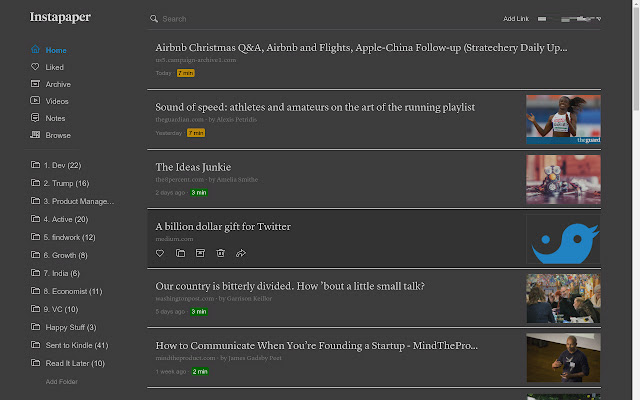
2. Colour coded reading time on Instapaper.com
✓ green for quick reads,
✓ red for long reads,
✓ amber for everything in between :)
*** Login to Instapaper in the extension to add even more jazz to Instapaper ***
1. AcceleReader popup:
✓ See top 20 articles from your home folder
✓ Super quick search through all articles in your home folder
✓ Open article directly in Instapaper
✓ Like, archive, move, or delete articles even when offline!
2. Use extension button to:
✓ quickly add current webpage to Instapaper
✓ open Instapaper list, or
✓ read a random article from your Instapaper list
3. Use *keyboard shortcuts* anywhere in Chrome for any of above actions
4. See count of unread articles on extension button.
5. Save articles to Instapaper when offline. Extension will automatically save them when you connect again.
6. See pages already in your list - extension icon turns red if a webpage is already in your list.
7. Use the `Article saved` notification to read the article on Instapaper.com, or to move it to a folder.
--------------------------------------------------------------
Update 04 Dec 2019:
1. Added links to AcceleReader for Android
Update 13 Jun 2019:
1. Added a refresh button to extension popup
2. Minor background code updates
Update 07 May 2019:
1. Added setting to disable notifications when articles are added
2. Removed donation links (beginning of end of active development)
Update 13 Oct 2018:
1. Instaread - Save a page, and open it immediately in Instapaper for reading
- Available from right-clicking the extension button
2. Lots of behind the scene code changes. Apologies if anything breaks!
Update 4 Oct 2018:
1. Instaread - Save a page, and open it immediately in Instapaper for reading
- Set up custom keyboard shortcut to add current page and open for reading, or
- Set up right-click menu item to save a page or link, and open it for reading
--------------------------------------------------------------
Disclaimer: This is an unofficial, 3rd party extension. It uses the Instapaper API, but has no commercial affiliation with Instapaper.
Why Download AcceleReader for Instapaper?
- ✅ Trusted by 1000+ users worldwide
- ✅ High Rating: 4.83/5 stars from 6 reviews
- ✅ Latest Version: 4.20.2 - Always up to date
- ✅ Safe & Secure: Verified by Chrome Web Store
- ✅ Free to Use: No cost required
Extension Details
Discover AcceleReader for Instapaper - The Best Chrome Extension for Your Browser
Looking for the perfect Chrome extension to enhance your browsing experience? AcceleReader for Instapaper is one of the most popular and highly-rated extensions available on the Chrome Web Store, trusted by over 1000 users worldwide.
With an impressive 4.83-star rating based on 6 authentic user reviews, AcceleReader for Instapaper has proven its value and reliability to the Chrome community. This extension is perfect for users who want to improve their productivity, enhance their browsing security, or simply add useful functionality to their Chrome browser.
Download AcceleReader for Instapaper today and join thousands of satisfied users who have already discovered the benefits of this powerful Chrome extension. Installation is quick and easy - simply click the download button above to be redirected to the official Chrome Web Store where you can safely install this extension in just a few clicks.
Similar extensions