Marking Menu for Google Chrome™
About Marking Menu for Google Chrome™
Out-of-the-box, you can:
- create and destroy tabs,
- travel forward and backward through your history,
- move between tabs, and
- fling the page up or down.
You can also extend Marking Menu to support other actions!
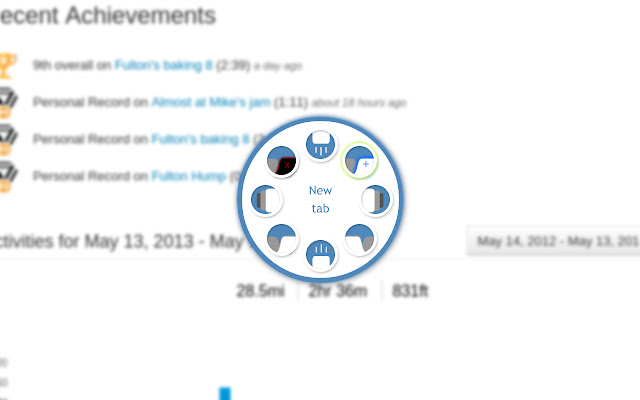
Bring up the menu by holding the right mouse button. Then, move towards the appropriate icon, and release. If you are hovering over a link, the menu won't appear right away (in case you are trying to click a link), but will react appropriately if you flick.
If you'd prefer to use the middle mouse button instead, just make that change in the preferences. Simply browse to chrome:extensions and click the Options button next to Marking Menu for Google Chrome.
Change history:
- 0.6:
- Retina-quality images for the Chromebook Pixel.
- Updated to Chrome Manifest v2.
- Menu now defaults to right-mouse button.
- 0.5:
- Ability to change which actions appear in the menu.
- Support for third-party actions - if you specify an action that hasn't been handled by Marking Menu, it will dispatch an event from window for another extension to handle.
- Added support for Safari.
- 0.2.2:
- Finally fixed scrolling and back/forward compatibility in newer versions of Chrome.
- 0.2.1:
- Context menu enabled when you right-click a link.
- 0.2:
- Ability to select which button triggers the menu.
Notes:
- A marking menu can sometimes be called radial menu or pie menu. No matter what you call it, Chrome Marking Menu is what you're looking for.
- I've finally released the source code. It's no more ready for this now than it was when I started in 2009, but since I don't commit new changes very frequently anymore, I figured there's no sense it putting it off any longer:
https://code.google.com/p/marking-menu-js/
Why Download Marking Menu for Google Chrome™?
- ✅ Trusted by 496+ users worldwide
- ✅ High Rating: 3.91/5 stars from 35 reviews
- ✅ Latest Version: 0.6 - Always up to date
- ✅ Safe & Secure: Verified by Chrome Web Store
- ✅ Free to Use: No cost required
Extension Details
Discover Marking Menu for Google Chrome™ - The Best Chrome Extension for Your Browser
Looking for the perfect Chrome extension to enhance your browsing experience? Marking Menu for Google Chrome™ is one of the most popular and highly-rated extensions available on the Chrome Web Store, trusted by over 496 users worldwide.
With an impressive 3.91-star rating based on 35 authentic user reviews, Marking Menu for Google Chrome™ has proven its value and reliability to the Chrome community. This extension is perfect for users who want to improve their productivity, enhance their browsing security, or simply add useful functionality to their Chrome browser.
Download Marking Menu for Google Chrome™ today and join thousands of satisfied users who have already discovered the benefits of this powerful Chrome extension. Installation is quick and easy - simply click the download button above to be redirected to the official Chrome Web Store where you can safely install this extension in just a few clicks.
Similar extensions