ChroPath
About ChroPath
Let us make it very clear that we don't track any user data. Everything runs in your local for this extension. Whatever stats or number of users we get is from the chrome store.
Please contact us at [email protected] for support.
Instructions:
1. Right-click on the web page, and then click Inspect.
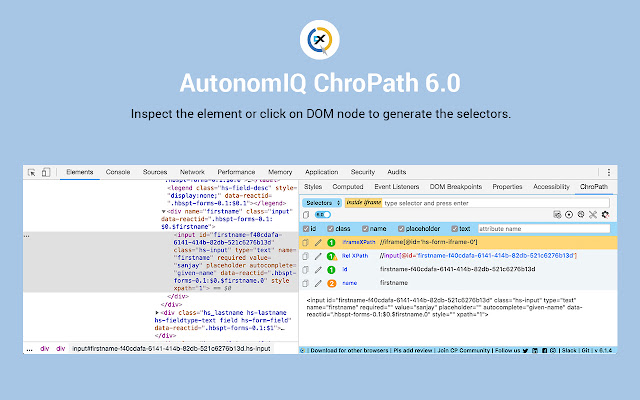
2. In the right side of Elements tab, click on ChroPath tab. Please refer attached screenshot.
3. To generate selectors, inspect element or click on any DOM node, it will generate the unique relative XPath/absolute XPath/CSS selector/linkText/partialLinkText.
4. To evaluate XPath/CSS, type the XPath/CSS query and press enter key.
As you enter, it will query in DOM for the relevant element/node. You can view the matching node(s) and nodes value as per their sequential occurrence. A green colour outline appears around to highlight the first matching elements and rest in blue colour in the web page.
5. If you mouse hover on any matching node in the ChroPath tab, green/blue dashed outline will convert into dotted orange red to highlight the corresponding element in the webpage.
6. If the found element is not in visible area on webpage then mouse hover on found node in ChroPath panel will scroll that element in the visible area with dotted orange red outline.
7. If found element is not highlighted but visible then on mouse hover on matching node on ChroPath tab it will highlight element with dotted orange red outline.
8. copy the locators by clicking on copy icon.
9. click on edit icon if want to edit any locator.
Change log 6.0-
New Features:
1. All possible locators like id, className, name, xpath etc along with the number of occurrences.
2. Unique relative and absolute XPath for SVG elements & SVG child elements.
3. iframe xpath along with element xpath.
4. ChroPath will suggest the relative xpath for user's selector i.e. when user will verify the selector in CP then CP will suggest the unique relative xpath for the first matching node.
5. Automation command with label as well. No more time waste in editing command.
6. Alert for dynamic id/class, meaningful error message and much more.
7. Reset button to set all the default config.
8. ChroPath will save the user attribute and predefined command in local config so next time when user open CP, user doesn't need to waste time and can get last set configuration automatically.
9. Copy all recorded selectors/steps from ChroPath tab itself without downloading xls.
10. Option to generate XPath with and without text.
11. ChroPath Studio.
12. Smart Maintenance.
Why Download ChroPath?
- ✅ Trusted by 100000+ users worldwide
- ✅ High Rating: /5 stars from reviews
- ✅ Latest Version: 6.1.10 - Always up to date
- ✅ Safe & Secure: Verified by Chrome Web Store
- ✅ Free to Use: No cost required
Extension Details
Discover ChroPath - The Best Chrome Extension for Your Browser
Looking for the perfect Chrome extension to enhance your browsing experience? ChroPath is one of the most popular and highly-rated extensions available on the Chrome Web Store, trusted by over 100000 users worldwide.
With an impressive -star rating based on authentic user reviews, ChroPath has proven its value and reliability to the Chrome community. This extension is perfect for users who want to improve their productivity, enhance their browsing security, or simply add useful functionality to their Chrome browser.
Download ChroPath today and join thousands of satisfied users who have already discovered the benefits of this powerful Chrome extension. Installation is quick and easy - simply click the download button above to be redirected to the official Chrome Web Store where you can safely install this extension in just a few clicks.
Similar extensions