Circuit Extender
About Circuit Extender
2.0.0.0 12 Jul 2018
- use official Blink1Control2 App API for Blink1 control
- cleanup
1.9.1.0 22 Mar 2017
- fix: sidebar icons not shown propera after Circuit update
1.9.0.0 17 Jan 2017
- fix: RSS and Notes icon not displayed
- add: Jira Activity Stream RSS reader
- add: new Icons for Notes and RSS
1.8.1.0 16 Nov 2016
- fix: audio enhancements (ringer) does not work correctly without Blink1 device attached
- fix: multiple (+) signs on top of RSS icon for new items available on feed
- fix: missing weather information for multi-word cities
- update: RSS can now handle Atom feeds
1.8.0.0 08 Nov 2016
- combine clocks and weather and provide weather data next to the clocks
- move RSS reader into sidebar
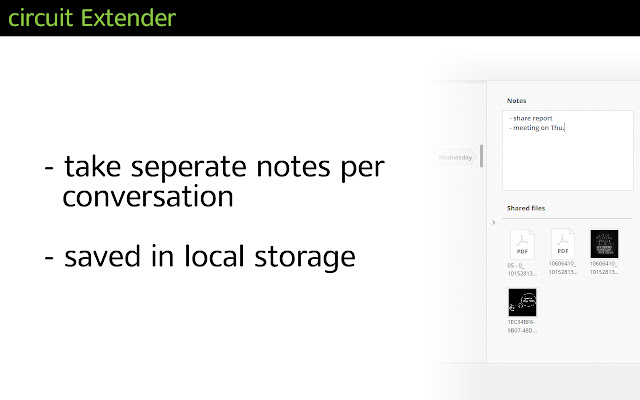
- fix: do not close notes area on conversation change
1.7.0.0 02 Nov 2016
- add blue color to Blink1 feature for unread mentions
- change audio control feature to play ringtone via selected audio output device
- change audio control feature to play attached videos and voice recordings via selected audio output device
- fix full message preview
- fix keyboard shortcut ALT+R for rich text editor mode
- fix displaying RSS feed in "new" layout
- fix notes feature, adapted to sidebar
- cleanup: remove some unused and broken features
1.6.0.11 02 Sep 2016
- fix blink1 in state red on login page
1.6.0.10 02 Sep 2016
- fix blink1 due to some more DOM changes
1.6.0.9 15 Aug 2016
- add new circuit domain to whitelist
1.6.0.8 22 Apr 2016
- fix Blink(1) due to DOM changes
1.6.0.7 08 Mar 2016
- fix displaying hotword popup
1.6.0.6 06 Mar 2016
- allow usage of circuit extender in circuit.com domain
1.6.0.5 09 Feb 2016
- fix hotword detection
1.6.0.4 03 Feb 2016
- fix weather location ID
1.6.0.3 31 Jan 2016
- fix for anchor for JIRA hotword selection
1.6.0.2 29 Jan 2016
- fix overwriting of Favorites avatars in global panel
1.6.0.1 28 Jan 2016
- fix displaying RSS feed
1.6.0.0 17 Jan 2016
- re-impl GetWeatherData (city/region/country),
move all OpenWeatherMap specific code into background
generate ISO3166 countrycodes for OpenWeatherMap api
generate ISO3166 subdivisions code for OpenWeatherMap api (DE, US only!)
- adjust to UI changes on the Circuit WebClient 1.1.4704 ( 9 Jan 2016)
- adapted ALT+R shortcut for new conversation model
- improve handling of new RSS items in the conversation list item
1.5.3.0 10 Dec 2015
- add OpenWatherMap signup link to options page
- re-add permissions to access external URLs
1.5.2.0 09 Dec 2015
- OpenWeatherMap API key now configurable
1.5.1.0 08 Dec 2015
- RSS: send new item back to the right chrome tab
- enhanced log messages
- less permissions
- clean up rss feed data
- add beta.circuit.com in manifest
- Audio Control is no longer experimental
1.5.0.0 Aug 2015
- added RSS Feed reader into Circuit Extender
- added full message preview feature
- more improvements to the options menu
- Google Analytics code to track feature usage
Why Download Circuit Extender?
- ✅ Trusted by 1000+ users worldwide
- ✅ High Rating: /5 stars from reviews
- ✅ Latest Version: 2.0.0.0 - Always up to date
- ✅ Safe & Secure: Verified by Chrome Web Store
- ✅ Free to Use: No cost required
Extension Details
Discover Circuit Extender - The Best Chrome Extension for Your Browser
Looking for the perfect Chrome extension to enhance your browsing experience? Circuit Extender is one of the most popular and highly-rated extensions available on the Chrome Web Store, trusted by over 1000 users worldwide.
With an impressive -star rating based on authentic user reviews, Circuit Extender has proven its value and reliability to the Chrome community. This extension is perfect for users who want to improve their productivity, enhance their browsing security, or simply add useful functionality to their Chrome browser.
Download Circuit Extender today and join thousands of satisfied users who have already discovered the benefits of this powerful Chrome extension. Installation is quick and easy - simply click the download button above to be redirected to the official Chrome Web Store where you can safely install this extension in just a few clicks.
Similar extensions