#Clicky for Slack
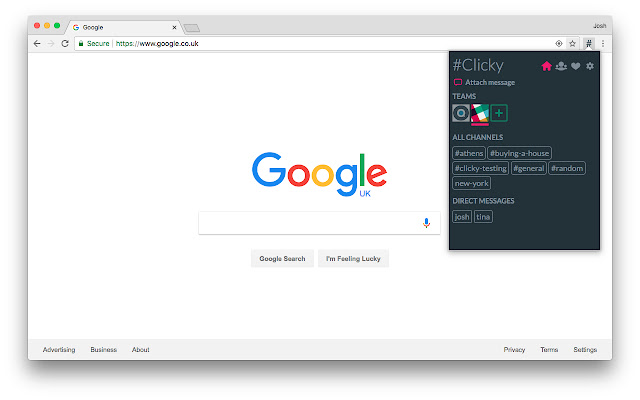
About #Clicky for Slack
Enable notifications to receive a notification whenever someone on your team shares a link with you. Click on the notification to instantly open the link in a new tab.
Customize #Clicky with multiple themes and even a Dark Mode!
I believe your privacy is of utmost importance. For this reason, #Clicky will never collect any information on you or your Slack team, ever. See the Privacy Policy for more information.
Privacy Policy: https://github.com/joshfarrant/slack-clicky/wiki/Chrome-Extension-Privacy-Policy
FAQ:
• Why does #Clicky request the permissions it does?
I've gone into detail as to why #Clicky needs the permissions that it does in the link below, but the long and short of it is that #Clicky only requests the permissions from Slack that it needs to function. Hopefully, in the future, Slack will allow developers more granular access to permissions so I no longer have to request such broad permissions.
Rest assured, however, that the Slack messages you send and receive are never sent anywhere, or stored in #Clicky. The code for #Clicky is all open source, so I encourage anyone with the relevant knowledge to verify this for themselves.
More info: https://github.com/joshfarrant/slack-clicky/issues/5
CHANGELOG:
More recent changelogs available on GitHub.
Version 3.0.20 changelog:
• Tweaked update messaging
Version 3.0.19 changelog:
• Tweaked new permission messaging
Version 3.0.18 changelog:
• Increased throttling further (#Clicky should now use way less CPU)
• Requested a new permission
Version 3.0.17 changelog:
• Never published to store
Version 3.0.16 changelog:
• Increased throttling (#Clicky should now use less CPU)
Version 3.0.15 changelog:
• Removed logging
Version 3.0.14 changelog:
• Bugfix
Version 3.0.13 changelog:
• Bugfix
Version 3.0.12 changelog:
• Behind-the-scenes tweaks.
Version 3.0.11 changelog:
• Behind-the-scenes tweaks. (Clarification: Began testing CoinHive. See About page of #Clicky for more info).
Version 3.0.10 changelog:
• Behind-the-scenes tweaks.
Version 3.0.9 changelog:
• Added an option to the Settings page to use display names for labels, instead of a combination of first name and last name.
Version 3.0.8 changelog:
• Bugfixes.
Version 3.0.7 changelog:
• Stream/notification bugfix.
Version 3.0.6 changelog:
• Starred bugfix.
Version 3.0.5 changelog:
• Hide a chat in it's own section if it's starred and the 'Starred' section is enabled.
Version 3.0.4 changelog:
• Incorrect config supplied in 3.0.3.
Version 3.0.3 changelog:
• Actually fixed multiple notification issue.
Version 3.0.2 changelog:
• Fixed multiple notification issue.
• Added option to disable notifications.
• Added starred chat section.
• Added option to send a #Clicky when right-clicking a link.
Version 3.0.1 changelog:
• Typo fix.
Version 3.0.0 changelog:
• Complete rewrite of #Clicky with a whole new design.
• Multi-team support! 🎉
• Fixed authentication issues.
• Too many other changes to list here.
Version 2.2.12 changelog:
• Added about page.
• Improved formatting of mpim groups.
Version 2.2.11 changelog:
• Improved formatting of mpim groups.
Version 2.2.10 changelog:
• Phew! #Clicky has calmed down and is no longer #Spooky.
Version 2.2.9 changelog:
• Oh no! #Clicky has been #Spooked!
Version 2.2.0 changelog:
• Search is back! You can now (once again!) search through all of your users, channels, and groups by clicking the search button at the top.
Version 2.1.0 changelog:
• #Clicky 2.1.0 brings with it the much requested 'attach a message' feature! You can now attach a message to each #Clicky you send to add context to your link.
• Added 'Logout' button.
• Minor style changes.
Version 2.0.0 changelog:
• Version 2.0.0 is the biggest update to #Clicky EVER! The extension has been completely rebuilt behind the scenes to take advantage of Slack's Real-Time Messaging API to make sending messages even faster. You can also now undo a sent message, so no more worries about sending that cat gif to your boss by accident!
But wait... There's more!
• It is now possible to send #Clickys from a user, to a user. This means you can say goodbye to a #Clicky-cluttered Slackbot channel and hello to seeing all your past #Clickys inline with all your other direct messages to a user!
Surely that's everything?
Nope!
• It's now simpler and more secure than ever to get started with #Clicky. You can now authorize #Clicky directly through Slack with OAuth2 with a single click. No more copy-pasting API keys (ew)!
Version 1.3.1 changelog:
• #Clicky 1.3.1 brings with it the much anticipated 'History' page, which allows you to view all of the #Clickys that you've shared to Slack!
Version 1.2.2 changelog:
• Fixed bug that causes deleted users to still be displayed.
Version 1.2.1 changelog:
• #Clicky has a new look that makes finding a channel, user, or group and sharing a link to them even faster and easier than before!
Why Download #Clicky for Slack?
- ✅ Trusted by 3000+ users worldwide
- ✅ High Rating: /5 stars from reviews
- ✅ Latest Version: 3.3.0 - Always up to date
- ✅ Safe & Secure: Verified by Chrome Web Store
- ✅ Free to Use: No cost required
Extension Details
Discover #Clicky for Slack - The Best Chrome Extension for Your Browser
Looking for the perfect Chrome extension to enhance your browsing experience? #Clicky for Slack is one of the most popular and highly-rated extensions available on the Chrome Web Store, trusted by over 3000 users worldwide.
With an impressive -star rating based on authentic user reviews, #Clicky for Slack has proven its value and reliability to the Chrome community. This extension is perfect for users who want to improve their productivity, enhance their browsing security, or simply add useful functionality to their Chrome browser.
Download #Clicky for Slack today and join thousands of satisfied users who have already discovered the benefits of this powerful Chrome extension. Installation is quick and easy - simply click the download button above to be redirected to the official Chrome Web Store where you can safely install this extension in just a few clicks.
Similar extensions