WikiMaps
About WikiMaps
How to Use:
---Viewing the map---
• Click on the WikiMaps icon in the extensions icon toolbar in the upper right hand corner of the screen. Then click "Display Map"
---Adding a location to WikiMaps---
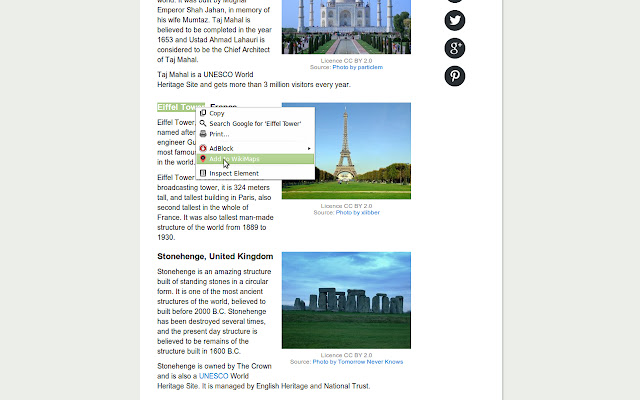
• Highlight some text you find on the web (for example "Empire State Building" or "Budapest, Hungary"). Then, right click on your highlighted text and select "Add to WikiMaps" in the menu that appears.
• Alternatively, in the map page (after you click "Display Map") you can enter locations to add in the "Add Locations" area.
---Removing locations---
• To remove a particular location, press the "x" button to the right of the location. To clear all locations, click the WikiMaps icon and then click "Clear List".
---Viewing Wikipedia Summary---
• To view the Wikipedia summary, click on an item in the map view and then click on "Summary" in the information window that appears above the map marker.
Other Features/Notes:
• Locations are saved locally and will be reloaded in the event you close your browser.
• You can sort the locations in the tables alphabetically by clicking on the "Location" label in the table.
• You can view a location in Google Maps by clicking "View in Google Maps" in the Wikipedia summary page of any location.
• If WikiMaps is unable to identify the location you attempted to add, the location will not be added.
• Not all locations will have complete or any Wikipedia data.
Future Improvements:
• Improve geocoding by pulling new coordinates from Wikipedia if data is found on Wikipedia for a location.
• Notifying the user whether an added location has been successfully added or was not successfully added.
• Better responsiveness to different window sizes.
• Ability to calculate distances between two locations on the map
• Ability to select multiple locations and export them to a Google map to get directions.
• Ability to export/share data with other users.
• Sets of locations
• Starred locations
See this on Github: https://github.com/AaronPlave/WikiMaps
Why Download WikiMaps?
- ✅ Trusted by 326+ users worldwide
- ✅ High Rating: /5 stars from reviews
- ✅ Latest Version: 1.2 - Always up to date
- ✅ Safe & Secure: Verified by Chrome Web Store
- ✅ Free to Use: No cost required
Extension Details
Discover WikiMaps - The Best Chrome Extension for Your Browser
Looking for the perfect Chrome extension to enhance your browsing experience? WikiMaps is one of the most popular and highly-rated extensions available on the Chrome Web Store, trusted by over 326 users worldwide.
With an impressive -star rating based on authentic user reviews, WikiMaps has proven its value and reliability to the Chrome community. This extension is perfect for users who want to improve their productivity, enhance their browsing security, or simply add useful functionality to their Chrome browser.
Download WikiMaps today and join thousands of satisfied users who have already discovered the benefits of this powerful Chrome extension. Installation is quick and easy - simply click the download button above to be redirected to the official Chrome Web Store where you can safely install this extension in just a few clicks.
Similar extensions