
BulkEdit Opportunity Pipeline in Salesforce
About BulkEdit Opportunity Pipeline in Salesforce
** If the download as Excel/PDF not working please Mark "Always Allow" for Adobe flash player setting by clicking in the following link.
http://www.macromedia.com/support/documentation/en/flashplayer/help/settings_manager04.html
(This plugin uses swf for the download feature so if you have this setting as Always Deny or Always ask then it may not work)
Salesforce My Open Opportunities/Pipeline Management (https://sites.google.com/site/bulkeditopportunities/) is a Google Chrome Productivity Extension with following Features: (Please refresh your salesforce browser Tab prior to clicking on the Chrome extension Icon.):
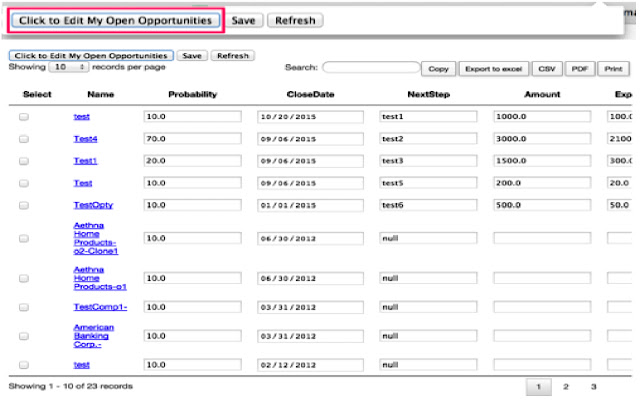
1) By Clicking Edit My Open Opportunities will fetch the Opportunities owned by you from your logged in salesforce instance
2) It allows to update the Opportunity Pipeline fields: Probability, Close Date, Amount, Next Steps, ForecastCategory
3) From the list of opportunities you can select the opportunities you would like to Mass-Edit Probability, Close Date, Amount, Next Steps and save the records.
4) You can View the result in a paginated format, allows search within your result, You can sort a column in the result set
5) Click on xls, csv,pdf to download the result in the given format, copy to copy the result and print to print the result.
6) This extension will be useful for your Pipeline Forecast calls.
User needs to login to the Salesforce.com org in the browser or refresh the page if already logged-in before clicking on the Chrome extension. The chrome extension reads the session cookie and runs the query/update against the respective Salesforce.com org. There is no need to login again in the extension pop-up. Works well when you are working on multiple orgs and manage your pipeline in multiple orgs at ease.
This is something I tried out to learn how to make a Chrome Extension. The error handling is not done quite well.
Why Download BulkEdit Opportunity Pipeline in Salesforce?
- ✅ Trusted by 63+ users worldwide
- ✅ High Rating: /5 stars from reviews
- ✅ Latest Version: 0.2 - Always up to date
- ✅ Safe & Secure: Verified by Chrome Web Store
- ✅ Free to Use: No cost required
Extension Details
Discover BulkEdit Opportunity Pipeline in Salesforce - The Best Chrome Extension for Your Browser
Looking for the perfect Chrome extension to enhance your browsing experience? BulkEdit Opportunity Pipeline in Salesforce is one of the most popular and highly-rated extensions available on the Chrome Web Store, trusted by over 63 users worldwide.
With an impressive -star rating based on authentic user reviews, BulkEdit Opportunity Pipeline in Salesforce has proven its value and reliability to the Chrome community. This extension is perfect for users who want to improve their productivity, enhance their browsing security, or simply add useful functionality to their Chrome browser.
Download BulkEdit Opportunity Pipeline in Salesforce today and join thousands of satisfied users who have already discovered the benefits of this powerful Chrome extension. Installation is quick and easy - simply click the download button above to be redirected to the official Chrome Web Store where you can safely install this extension in just a few clicks.
Similar extensions




