PanLex Translator
About PanLex Translator
1) After installing this extension, please either reload your open tabs or restart Chrome.
2) Click the extension icon (next to Chrome address bar) to open "Extension Options".
3) Select the languages you want to translate "from" and "to". Choose "Auto Detect" for "Translate from" if you want the extension to automatically identify the source language.
4) If you could not find the language you prefer, click "more languages" on the "Extension Options" menu to open a table of all supported languages.
5) Search for your preferred language by typing the language name under "Language Name", and select it by click the radio button on its left (translate from) or right (translate to).
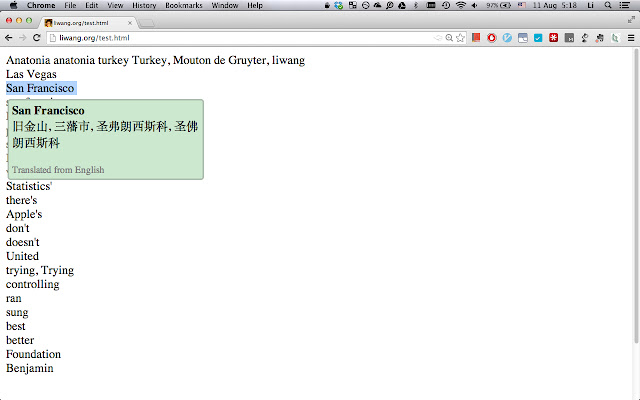
6) Select the word/phrase you want to translate on a webpage.
7) By default, this extension will show a popup window when you select or double-click a word/phrase. To change this behaviour, a trigger key can be set in the "Extension Options" menu. After setting the trigger key to "Alt/Option", the popup window will only be shown when you select/double click a word/phrase *and* press "Option" (Mac OSX) or "Alt" (Other systems) at the same time.
Introduction
------------
This extension demonstrates the inter/intra-lingual translation functionalities of PanLex (http://panlex.org/), a project of The Long Now Foundation (http://longnow.org/). The PanLex open-source database aims to document all known lexical translations and thereby to help users express any lexical concept in any language. PanLex editors are consulting thousands of dictionaries and other knowledge sources to build the database, which already documents a billion lexical translations, from which billions more can be derived. This extension is built upon this database, by using its public API (http://api.panlex.org).
Features
--------
- When installed, provide translations between 9231 languages, by selecting words/phrases on webpages. (Information about supported languages can be found at http://panlex.org/try.)
- Provide the option to automatically identify the source language of the selected content. This automatic language identification supports 97 languages as described at https://github.com/saffsd/langid.py
Limitations
--------
- Many direct translations between two languages are not available, we will implement 2-step translations in future updates.
- This extension only supports English lemmatization at the moment. We will introduce lemmatization for other languages in future updates.
- This extension only supports word-level and phrase-level translations.
Acknowledgement
---------------
The development of this extension has been supported by many people, who made the release of this extension possible. Particular mention goes to people who have given me indispensable help and stimulation: Jonathan Pool <[email protected]>, David Kamholz <[email protected]>, Marco Lui <[email protected]>, and Timothy Baldwin <[email protected]>.
This extension also extensively uses source code from the open source community, and borrows ideas from other similar applications:
- Thanks to Marco Lui <[email protected]> who provided the Javascript version (https://github.com/saffsd/langid.js) of his language identification tool `langid.py` (https://github.com/saffsd/langid.py).
- This extension is heavily inspired by a similar translation extension from Google, namely Google Dictionary (http://goo.gl/bqrQ14), which mainly focuses on 13 languages.
- This extension also makes use of jQuery (http://jquery.com/) and tablesorter (https://github.com/christianbach/tablesorter).
- This extension also uses English lemmatization exception dictionaries from WordNet (http://wordnet.princeton.edu/)
Why Download PanLex Translator?
- ✅ Trusted by 674+ users worldwide
- ✅ High Rating: /5 stars from reviews
- ✅ Latest Version: 1.4.1 - Always up to date
- ✅ Safe & Secure: Verified by Chrome Web Store
- ✅ Free to Use: No cost required
Extension Details
Discover PanLex Translator - The Best Chrome Extension for Your Browser
Looking for the perfect Chrome extension to enhance your browsing experience? PanLex Translator is one of the most popular and highly-rated extensions available on the Chrome Web Store, trusted by over 674 users worldwide.
With an impressive -star rating based on authentic user reviews, PanLex Translator has proven its value and reliability to the Chrome community. This extension is perfect for users who want to improve their productivity, enhance their browsing security, or simply add useful functionality to their Chrome browser.
Download PanLex Translator today and join thousands of satisfied users who have already discovered the benefits of this powerful Chrome extension. Installation is quick and easy - simply click the download button above to be redirected to the official Chrome Web Store where you can safely install this extension in just a few clicks.
Similar extensions