GetTorrent
About GetTorrent
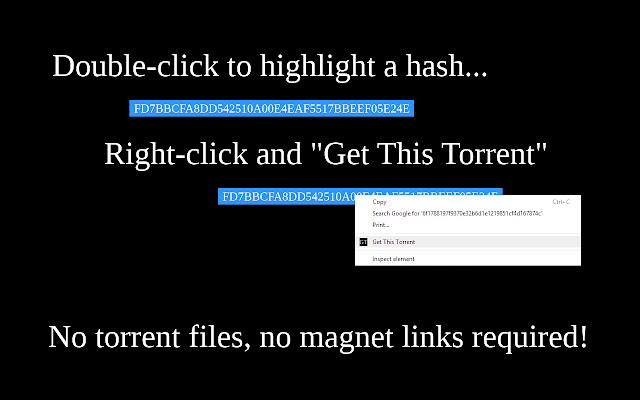
No torrent files or magnet links are required to quickly get started fetching the metadata for your download, just a 40-character hexadecimal code comprised of numbers and letters.
FD7BBCFA8DD542510A00E4EAF5517BBEEF05E24E
↑↑↑
With this extension, you can highlight the above text then right click and begin downloading! No longer can peer-to-peer file sharing be censored effectively when web users can manually initiate their own downloads.
This extension is compatible with any torrent client that supports the magnet URI scheme.
IF THIS EXTENSION DOES NOT WORK IMMEDIATELY FOR YOU, PLEASE READ THIS FIRST:
This extension works in conjunction with your torrent client. By default, it will open the program you download torrents with if it is able to handle magnet URI addresses. If there is no torrent client set to work with the magnet protocol in Chrome however, you may experience a problem.
It is easy to fix this, just locate your local state file and delete the line relating to the magnet protocol, then save it! Here are some detailed instructions on how to do this:
-- Close your Chrome browser (this is important). Depending on your operating system, navigate to the following folder path:
Mac OS X: /user/library/Application Support/Google/Chrome
Windows Vista/7/8: \Users\(username)\AppData\Local\Google\Chrome\User Data
Windows XP: \Documents and Settings\(username)\Application Data\Local\Google\Chrome\User Data
Within Windows operating systems this will be a hidden folder. Hidden files and folders can be seen by enabling this within Folder Options. In Windows XP or Vista open the control panel and switch to Classic View, then open Folder Options. In Windows 7 type "Folder Options" into the Start Menu. In Windows 8 press Windows+W to open the Start Menu search window then type Folder Options.
-- Open the "Local State" file using a text editor. Locate the section headed "protocol_handler" and the line indented under it containing "magnet." Delete that entire line containing "magnet" and nothing else. Save the file, ensuring that it is saved as "all files" or the default file type, with no file extension.
--- Reopen Chrome, and the next time you use this extension (or click on a magnet link) it will ask you what program you would like to handle the magnet protocol by default (make sure it is your primary torrent client).
Please leave suggestions for new features or improvements. Feel free to link to this extension from anywhere without permission. If you have a question feel free to bring up an issue.
Always remember, using BitTorrent is perfectly legal, but downloading copyrighted material isn't. Be aware of what you download or face the consequences.
Why Download GetTorrent?
- ✅ Trusted by 5000+ users worldwide
- ✅ High Rating: /5 stars from reviews
- ✅ Latest Version: 1.2.1 - Always up to date
- ✅ Safe & Secure: Verified by Chrome Web Store
- ✅ Free to Use: No cost required
Extension Details
Discover GetTorrent - The Best Chrome Extension for Your Browser
Looking for the perfect Chrome extension to enhance your browsing experience? GetTorrent is one of the most popular and highly-rated extensions available on the Chrome Web Store, trusted by over 5000 users worldwide.
With an impressive -star rating based on authentic user reviews, GetTorrent has proven its value and reliability to the Chrome community. This extension is perfect for users who want to improve their productivity, enhance their browsing security, or simply add useful functionality to their Chrome browser.
Download GetTorrent today and join thousands of satisfied users who have already discovered the benefits of this powerful Chrome extension. Installation is quick and easy - simply click the download button above to be redirected to the official Chrome Web Store where you can safely install this extension in just a few clicks.
Similar extensions