
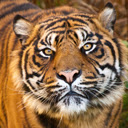
Wild Cats New Tab
Add to Chrome
Opens the official Chrome Web Store

About Wild Cats New Tab
Wild Cats Fan? Start each day with the Wild Cats's most gorgeous pictures!Hello, dear feline lovers! I have a surprise for you: a cool new tab extension that features some FANTASTIC pictures of big cats: tigers, lions, leopards, mountain lions, big and small, cute and fierce.
It's a daily pleasure to be surprised by this great HD pictures!
What other features this extension has:
- intuitive Google Search form
- speed dial
- easy to use (simple mouse-over) buttons for: Bookmarks, Apps, Most Visited and Last Visited
- nice inspiring quotes
I hope that this extension brings you some smiles, just it brings mine!
Rights explanation: in order to display in such a friendly format the Bookmarks, Apps, Most and Last Visited sites, the extension must read these elements. That's it :)
If you have any features requests, suggestions or 5 star reviews, please let me know.
Thanks. Meow! :)
-----------
How to uninstall it (if you decided you like dogs better, or for whatever other reason;) ):
Go and type in the chrome toolbar: chrome://extensions, scroll down a little bit until you'll see the extension. Un-check it and it's gone!