
Play to Kodi
About Play to Kodi
Requirements:
-Kodi Eden (v11) or later
-The relevant plugin installed on Kodi
-YouTube plugin must be version 4.4.4 or later
How to use:
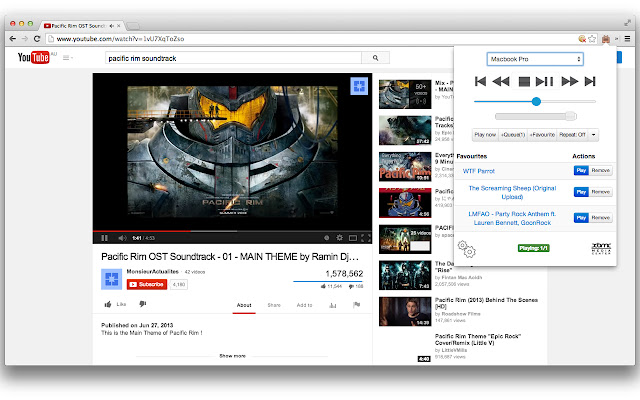
- "Play now" button sends the currently playing video of your active tab to Kodi. If there are videos currently in a queue, it would be cleared and the current video would be played.
- "+Queue (X)" button puts the video of your current tab to the end of the playlist on Kodi. A number in parenthesis shows the number of items currently in the queue.
- "+Favourite" button keeps the video of your current tab in your favourite list for easy access.
- Drag and drop your favourites to rearrange them.
- With the extension window open, you can use some of your keyboard keys to remotely control Kodi. These keys are: Arrow keys, Backspace, Enter, "I" and "C".
- Right click on YouTube links to play or queue.
Permissions:
- Your data on all websites: Needed so that the extension could send JSON requests to any URL that you might put in the settings.
- Your tabs and browsing activity: Used only for getting the URL of the current tab so that we could use it to obtain the video id for sending to Kodi.
Setup:
- On Kodi, go under System > Settings > Services > Webserver
- Enable "Allow control of Kodi via HTTP, leave the port as default or set it to something else (if you know what you're doing). Write down the port number.
- Username and password are optional
- Right click on the 'Play to Kodi' icon and select 'Options'
- Put in the IP address or hostname of your Kodi box and fill in the port number with the port number you wrote down earlier. Fill in the username and password if you entered one into Kodi.
- Visit YouTube, watch some videos and click on the 'Play to Kodi' icon to play them on Kodi.
Alternatively, you could also visit the source code on
https://github.com/khloke/play-to-xbmc-chrome
to submit issue tickets.
Credits:
Icon was generously provided for free by IconDock.com :)
Why Download Play to Kodi?
- ✅ Trusted by 40000+ users worldwide
- ✅ High Rating: 4.47/5 stars from 437 reviews
- ✅ Latest Version: 1.9.2 - Always up to date
- ✅ Safe & Secure: Verified by Chrome Web Store
- ✅ Free to Use: No cost required
Extension Details
Discover Play to Kodi - The Best Chrome Extension for Your Browser
Looking for the perfect Chrome extension to enhance your browsing experience? Play to Kodi is one of the most popular and highly-rated extensions available on the Chrome Web Store, trusted by over 40000 users worldwide.
With an impressive 4.47-star rating based on 437 authentic user reviews, Play to Kodi has proven its value and reliability to the Chrome community. This extension is perfect for users who want to improve their productivity, enhance their browsing security, or simply add useful functionality to their Chrome browser.
Download Play to Kodi today and join thousands of satisfied users who have already discovered the benefits of this powerful Chrome extension. Installation is quick and easy - simply click the download button above to be redirected to the official Chrome Web Store where you can safely install this extension in just a few clicks.
Similar extensions