Google Slides Auto Resize Speaker Notes
About Google Slides Auto Resize Speaker Notes
Show your support :) http://deanattali.com/aboutme/#feed-meeee
Description
========
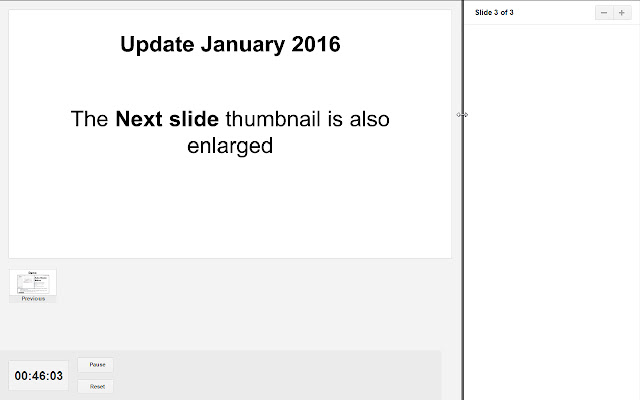
The slide previews in the Speaker Notes window of Google Slides are tiny and unreadable. This extension fixes this in two ways: the slides are automatically enlarged when the Speaker Notes window is resized, and you can also drag the sidebar to manually select the perfect slides size.
If you've ever used Google Slides (or MS PowerPoint/anything similar), you may be aware of the Speaker Notes feature - it allows you to view the current and next slides as well as the text notes for the current slide . However, for some weird reason, the Speaker Notes in Google Slides only allocates a very small area for the slides preview, while giving the notes almost all the space. There is no possible way to resize the slide thumbnail, which makes the slide preview almost useless.
Demo
========
If you don't have a Google Slides document to experiment with/verify this problem, you can test it out with this sample Google Slides presentation: https://docs.google.com/presentation/d/18svsKPFNQrBLOSAmOouD410kX9fuaNp3e1K1GTTBLiU/edit?usp=sharing
Extra features
========
- Resizes thumbnail preview for the Next slide
- Ability to move the timer to the right because it sometimes takes up a large portion of the screen and hides some of the slide
- Works in offline mode
Supported languages
========
This extension will work if your Chrome language is one of the following: English, French, Spanish, German, Dutch, Hebrew. If you want me to add support for another language, please open an issue on the project page: https://github.com/daattali/gslides-betternotes-extension/issues
Motivation
========
As preparation for my committee meeting, I used Google Slides to make my presentation. Shortly after starting, before havin any actual content in my presentation, I noticed that the Speaker Notes window is basically useless in its current form because of how small the slide previes are. After fiddling with the speaker notes window JavaScript and CSS for a couple hours, I decided that a much better use of my time instead of working on my committee meeting would be to make this extension. I then proceeded to spend the next several hours making the draft version of this extension, and thus successfully procrastinated from my real work for many many hours!
On a more serious note - I do think this is a very essential tool for anyone who uses Google Slides to give presentations.
Why Download Google Slides Auto Resize Speaker Notes?
- ✅ Trusted by 8000+ users worldwide
- ✅ High Rating: 4.62/5 stars from 26 reviews
- ✅ Latest Version: 1.2 - Always up to date
- ✅ Safe & Secure: Verified by Chrome Web Store
- ✅ Free to Use: No cost required
Extension Details
Discover Google Slides Auto Resize Speaker Notes - The Best Chrome Extension for Your Browser
Looking for the perfect Chrome extension to enhance your browsing experience? Google Slides Auto Resize Speaker Notes is one of the most popular and highly-rated extensions available on the Chrome Web Store, trusted by over 8000 users worldwide.
With an impressive 4.62-star rating based on 26 authentic user reviews, Google Slides Auto Resize Speaker Notes has proven its value and reliability to the Chrome community. This extension is perfect for users who want to improve their productivity, enhance their browsing security, or simply add useful functionality to their Chrome browser.
Download Google Slides Auto Resize Speaker Notes today and join thousands of satisfied users who have already discovered the benefits of this powerful Chrome extension. Installation is quick and easy - simply click the download button above to be redirected to the official Chrome Web Store where you can safely install this extension in just a few clicks.
Similar extensions