Boxcryptor
About Boxcryptor
Boxcryptor for Chrome is currently in beta. You might encounter problems and glitches. Additionally, security of browser plugins is a field still under research. Please use it with appropriate caution.
If you experience any problems with this plugin, instead of leaving a 1-star review, we invite you to send us feedback or to contact our support to find the best way to help you. You can submit a ticket here: http://support.boxcryptor.com - Thank you!
*** IMPORTANT ****
Add an additional security layer to all your files and folders in the cloud with Boxcryptor. Encrypt all your data the quick and easy way before uploading it to your cloud! And the best: It's free!
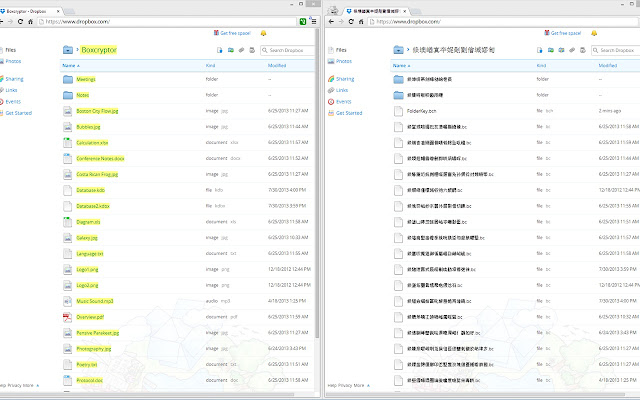
Boxcryptor is the encryption solution optimized for the cloud which allows you to use all popular cloud storage providers such as Dropbox, Google Drive, Microsoft SkyDrive and Box without sacrificing safety, privacy, or comfort. With Boxcryptor you can easily encrypt files locally in your browser before uploading them to your cloud. Your cloud provider only receives encrypted files and you keep complete control of your data!
Features:
- Supports popular cloud storage providers Dropbox, Google Drive, Microsoft SkyDrive and Box.
- Access all your encrypted documents in your cloud anytime (photos, music, etc.)
- Encryption and decryption is done directly in your Chrome browser - your password is never transmitted.
- Secure file encryption using the AES-256 and RSA-4096 standards.
- Boxcryptor Unlimited users can have filename encryption to hide any sensitive information that may be mentioned in the name of a file or folder.
Tip: The Boxcryptor Company Package offers additional features for businesses:
- Use a master key to be able to decrypt every employee's files
- Set policies to enforce rules
- Central user management and billing
Go to https://www.boxcryptor.com to find product manuals and more information about Boxcryptor.
Release notes:
--------------------
v2.0.205.88 (07/15/2014)
* Fixed: Minor issues and glitches
v2.0.205.87 (05/26/2014)
* Added: Google Drive for Business
* Fixed: Dropbox Navigation
* Fixed: Minor issues and glitches
v2.0.203.79 (03/11/2014)
* Fixed: Microsoft OneDrive
* Fixed: Minor issues and glitches
v2.0.201.49 (11/21/2013)
* Added: Remember password
* Added: Account information is synced in the background
* Fixed: Plaintext files open in the plugin's previewer
* Fixed: Fallback from NaCl to JS is not always working
* Fixed: Minor issues and glitches
Why Download Boxcryptor?
- ✅ Trusted by 10964+ users worldwide
- ✅ High Rating: 2.42/5 stars from 116 reviews
- ✅ Latest Version: 2.0.209.14 - Always up to date
- ✅ Safe & Secure: Verified by Chrome Web Store
- ✅ Free to Use: No cost required
Extension Details
Discover Boxcryptor - The Best Chrome Extension for Your Browser
Looking for the perfect Chrome extension to enhance your browsing experience? Boxcryptor is one of the most popular and highly-rated extensions available on the Chrome Web Store, trusted by over 10964 users worldwide.
With an impressive 2.42-star rating based on 116 authentic user reviews, Boxcryptor has proven its value and reliability to the Chrome community. This extension is perfect for users who want to improve their productivity, enhance their browsing security, or simply add useful functionality to their Chrome browser.
Download Boxcryptor today and join thousands of satisfied users who have already discovered the benefits of this powerful Chrome extension. Installation is quick and easy - simply click the download button above to be redirected to the official Chrome Web Store where you can safely install this extension in just a few clicks.
Similar extensions