Grabilla Screenshot
About Grabilla Screenshot
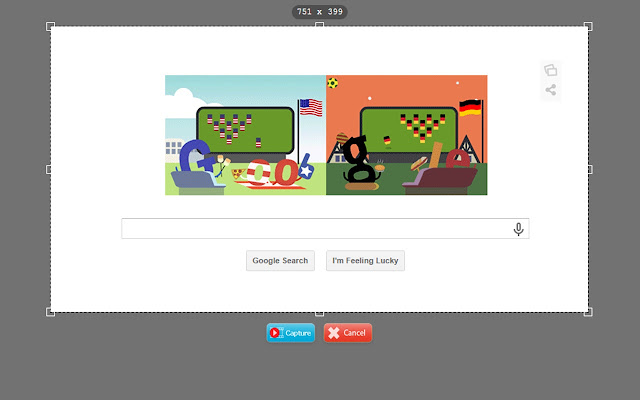
You can make a screenshot of some part of web page, or capture entire page from top to bottom. Extension will scroll page and make full-sized image of website.
Upload images to Grabilla from context menu - right-click on image and select Upload to Grabilla.
This Chrome extension also allows you to capture and save any part of any web page and share it with another people. Captured part of webpage will be saved with styles, links, images and formatting.
This web capture extension is perfect for archiving parts of web pages, providing explanations to people, bookmarking useful information that you want to check later. You can use it as proof page, or as backup of web page that you think may be changed later.
Unlimited captures history available.
Check your Grabilla capture history at http://grabilla.com/my-grabillas
Please check out our other services:
Free screen capture application: http://grabilla.com/
Upload and share any file: http://grabilla.com/upload
.
Grabilla Web Capture changelog:
13.11.14
+ Added http://grabilla.com/my-graillas link;
+ Added download links for all available versions. Windows, MacOS X, Android, iOS, Chrome, Firefox, Safari.
5.9.14
* Small bug fixes
+ URL tagging for Google Analytics
22.8.14
* Fixed context menus upload
19.7.14
* Fixed context menus - now you can click on image and upload it to Grabilla
* Fixed long image capture with scroll
26.6.14
+ Screenshot capture
+ Full page screenshot capture
* Minor improvements
12.5.14
+ Now you can reupload pictures to Grabilla server as images, not as html code.
11.2.14
+ Saved web captures now have <html> and <body> tags.
* Small bug fixes.
26.12.13
+ Added context menu to Chrome. You can capture entire web page or part of webpage with mouse right-click menu.
---
Please note - this extension uses Google Analytics to collect usage statistics. No personal imformation is collected.
Why Download Grabilla Screenshot?
- ✅ Trusted by 9241+ users worldwide
- ✅ High Rating: 2.59/5 stars from 74 reviews
- ✅ Latest Version: 2.3.0.2 - Always up to date
- ✅ Safe & Secure: Verified by Chrome Web Store
- ✅ Free to Use: No cost required
Extension Details
Discover Grabilla Screenshot - The Best Chrome Extension for Your Browser
Looking for the perfect Chrome extension to enhance your browsing experience? Grabilla Screenshot is one of the most popular and highly-rated extensions available on the Chrome Web Store, trusted by over 9241 users worldwide.
With an impressive 2.59-star rating based on 74 authentic user reviews, Grabilla Screenshot has proven its value and reliability to the Chrome community. This extension is perfect for users who want to improve their productivity, enhance their browsing security, or simply add useful functionality to their Chrome browser.
Download Grabilla Screenshot today and join thousands of satisfied users who have already discovered the benefits of this powerful Chrome extension. Installation is quick and easy - simply click the download button above to be redirected to the official Chrome Web Store where you can safely install this extension in just a few clicks.
Similar extensions