efTwo (F2) - Advanced Find on Page
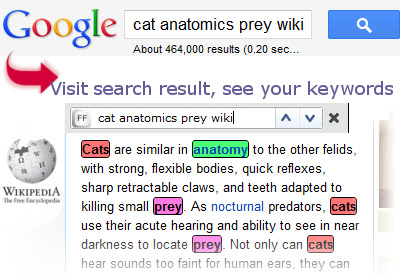
About efTwo (F2) - Advanced Find on Page
You don't have to worry about trying to create a strange word that might match on the page: if you are search for the word 'replace' you want to see 'replacing' as well, so you'd end up typing 'replac' in the search bar. With efTwo, you type in either 'replace' or 'replacing' and it will search all inflections for you. A truly essential and unique feature of efTwo.
To find just a specific word from your search term, just click that word and the search box will change: if you click the next button or hit a hotkey (eg F2), it will jump only to that word on the page.
Please, leave a comment, bug report or feature request in the comment box below.
I'm planning to add features to the plugin soon, but until then, I'd be more than happy to see some feedback from You!
============
What Others Say About Us
Lifehacker Australia
http://www.lifehacker.com.au/2011/07/eftwo-supercharges-find-on-browser-pages/
Lifehacker US
http://lifehacker.com/5831195/eftwo-supercharges-chromes-find-on-page-by-finding-multiple-words-at-once-word-variations
Lifehacker Japan
http://www.lifehacker.jp/2011/08/110818eftwo.html
Addictivetips
http://www.addictivetips.com/internet-tips/eftwo-f2-finds-multiple-words-their-inflections-on-a-page-chrome/
Makeuseof
http://www.makeuseof.com/dir/eftwo-word-inflections/
============
What's new
1.4
Fixing the bug with losing the settings over time (finally)
Making the extension compatible with new Chrome versions
1.3.1
More robust Google keyword detection
1.3.0
Fix for Google Search keywords, bugfixes
1.2.1
Bugfixes
1.2.0
Quoted search term support (partial)
Bugfixes
1.1.5
Added support for more search engines (currently Google, Bing, Yahoo is tested, more might be supported)
Added hover delete for easy word removal
Fixed settings page design
Support for shortcut scroll (pressing hotkey again scrolls to next keyword)
Bugfixes
1.1.0
Jump and highlight a specific word on the page (click the word then use the next/previous button).
Bugfixes
1.0.4 (Bugfix version)
1.0.3
Highlight markers on the scrollbar
Smooth scrolling
Bugfixes
1.0.2 (Bugfix version)
Why Download efTwo (F2) - Advanced Find on Page?
- ✅ Trusted by 8000+ users worldwide
- ✅ High Rating: 2.64/5 stars from 283 reviews
- ✅ Latest Version: 1.4 - Always up to date
- ✅ Safe & Secure: Verified by Chrome Web Store
- ✅ Free to Use: No cost required
Extension Details
Discover efTwo (F2) - Advanced Find on Page - The Best Chrome Extension for Your Browser
Looking for the perfect Chrome extension to enhance your browsing experience? efTwo (F2) - Advanced Find on Page is one of the most popular and highly-rated extensions available on the Chrome Web Store, trusted by over 8000 users worldwide.
With an impressive 2.64-star rating based on 283 authentic user reviews, efTwo (F2) - Advanced Find on Page has proven its value and reliability to the Chrome community. This extension is perfect for users who want to improve their productivity, enhance their browsing security, or simply add useful functionality to their Chrome browser.
Download efTwo (F2) - Advanced Find on Page today and join thousands of satisfied users who have already discovered the benefits of this powerful Chrome extension. Installation is quick and easy - simply click the download button above to be redirected to the official Chrome Web Store where you can safely install this extension in just a few clicks.
Similar extensions