MLB Baseball Tracker
About MLB Baseball Tracker
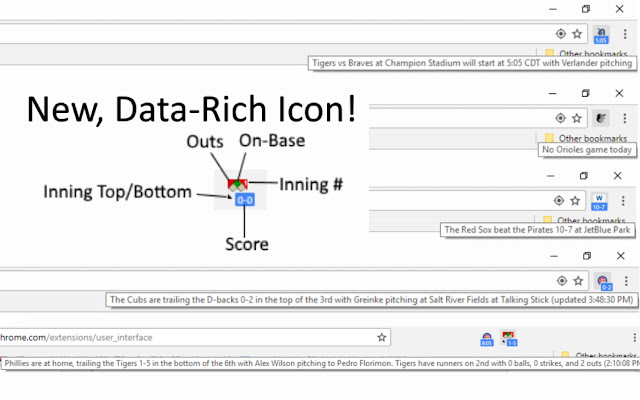
This extension adds an icon with your chosen MLB baseball team at the top of the browser that shows information about today's game in the icon's hover-text, real-time score and play information during games (including teams, location, inning, and pitcher), and the appropriate win/loss flag when it's over!
This is an active project - if you find a bug (or think of a useful feature), please report it via the extension's page in the Chrome store, and I'll get it updated as soon as I can!
All icons and team names are trademarks belonging to Major League Baseball Properties, Inc. or the respective teams, the owner of this application disclaims ownership of any trademarks, logos or images belonging to Major League Baseball Properties, Inc. or the respective team appearing on this site. The appearance of trademarks and/or team logos belonging to Major League Baseball Properties, Inc. or the respective team on this website does not constitute affiliation or endorsement by Major League Baseball or respective team of any of the services provided by this application.
Change History:
1.3 - Fixed bug where the "Teams" list could show just the first 2 teams repeatedly on initial startup
1.4 - Fixed time zone issue, changed icon left-click from Scoreboard to the current game's Box Score
1.5 - Fix issue with hovertext when a team has >10 runs
1.6 - Handle games that are Postponed
1.7 - Handle games that are Delayed Start
1.8 - Fixed issue where Delayed Start game wouldn't get updates right away after starting
2.0 - Updated to use MLB's new API, and updated the in-game icon so that you can see the score as well as what bases have runners on them, how many outs, top/bottom and inning number. Also includes additional info in hover-text like number of balls, strikes, outs, and current batter. Revert to the old, simpler in-game icon by ticking the "Enable Simplified In-Game View" option in the right-click menu.
2.1 - Fixed an issue with a previously unseen game state that caused game status to no longer update. Implemented a workaround that should prevent this from causing breaking changes in the future.
2.2 - Fixed a bug occurring on days with no games, and added handling for new game status.
2.3 - Fixed a (timezone conversion) bug causing night games to not register as a game today.
2.4 - Updated game postponement info in hover text
2.5 - Fixed a bug in the hovertext where the incorrect team would be named with players on base
2.6 - Added a third view option for non-fans to only see if there's a home game today or not without any game details, and restructured the menu a bit to accommodate it
2.7 - Added Arizona timezone
Why Download MLB Baseball Tracker?
- ✅ Trusted by 2000+ users worldwide
- ✅ High Rating: 4.67/5 stars from 6 reviews
- ✅ Latest Version: 2.8 - Always up to date
- ✅ Safe & Secure: Verified by Chrome Web Store
- ✅ Free to Use: No cost required
Extension Details
Discover MLB Baseball Tracker - The Best Chrome Extension for Your Browser
Looking for the perfect Chrome extension to enhance your browsing experience? MLB Baseball Tracker is one of the most popular and highly-rated extensions available on the Chrome Web Store, trusted by over 2000 users worldwide.
With an impressive 4.67-star rating based on 6 authentic user reviews, MLB Baseball Tracker has proven its value and reliability to the Chrome community. This extension is perfect for users who want to improve their productivity, enhance their browsing security, or simply add useful functionality to their Chrome browser.
Download MLB Baseball Tracker today and join thousands of satisfied users who have already discovered the benefits of this powerful Chrome extension. Installation is quick and easy - simply click the download button above to be redirected to the official Chrome Web Store where you can safely install this extension in just a few clicks.
Similar extensions