Convert PDF to Word - PDFfiller
About Convert PDF to Word - PDFfiller
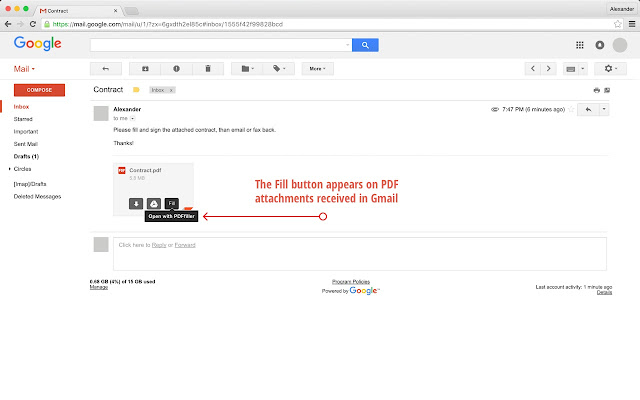
Simply click the “Fill” button when it appears on an email attachment or online, and a fillable version of the PDF document will instantly open in the PDFfiller editor ready for you to edit and convert to other formats like Word, Excel or PowerPoint.
To use PDFfiller Chrome Extension in Gmail, navigate to a PDF attachment, and click the fill button. Use PDFfiller to create convertible PDF documents and share via email or SMS. Or, search for a document you need and an orange fill button will appear next to any PDFs in the results. Easily convert PDFs to Word documents, email or fax them.
In PDFfiller editor, try our powerful editing tools first. Click the "Done" button if you’re done with editing, and choose "Save As" from the dropdown menu. You’ll have the option to save as PDF, Word, PowerPoint, or Excel.
When you convert as Word, the document will immediately convert and download, and can be edited in any software that supports .doc format.
With the new PDFfiller Google Chrome extension, converting PDF to Word from the web in PDFfiller has never been easier! In addition, you can search, create, edit, sign or export your documents through email or fax using PDFfiller's robust features.
***Please note that you must register for a free PDFfiller account to save your edited document (your original will remain in Google Drive), and a paid subscription is required to use some PDFfiller features.***
Want to try PDFfiller for FREE? Receive a free 7 day trial automatically when you register for PDFfiller after using this app! (Valid for new accounts only)
For converting PDF to Word on the go, check out the PDFfiller app on the App Store (coming soon to Android)!
For support, visit http://www.pdffiller.com
Follow us on Twitter: @pdf_filler
Like us on Facebook: facebook.com/pdffiller
Why Download Convert PDF to Word - PDFfiller?
- ✅ Trusted by 23708+ users worldwide
- ✅ High Rating: 3.09/5 stars from 68 reviews
- ✅ Latest Version: 0.2.7 - Always up to date
- ✅ Safe & Secure: Verified by Chrome Web Store
- ✅ Free to Use: No cost required
Extension Details
Discover Convert PDF to Word - PDFfiller - The Best Chrome Extension for Your Browser
Looking for the perfect Chrome extension to enhance your browsing experience? Convert PDF to Word - PDFfiller is one of the most popular and highly-rated extensions available on the Chrome Web Store, trusted by over 23708 users worldwide.
With an impressive 3.09-star rating based on 68 authentic user reviews, Convert PDF to Word - PDFfiller has proven its value and reliability to the Chrome community. This extension is perfect for users who want to improve their productivity, enhance their browsing security, or simply add useful functionality to their Chrome browser.
Download Convert PDF to Word - PDFfiller today and join thousands of satisfied users who have already discovered the benefits of this powerful Chrome extension. Installation is quick and easy - simply click the download button above to be redirected to the official Chrome Web Store where you can safely install this extension in just a few clicks.
Similar extensions