
myVocabu
About myVocabu
Features:
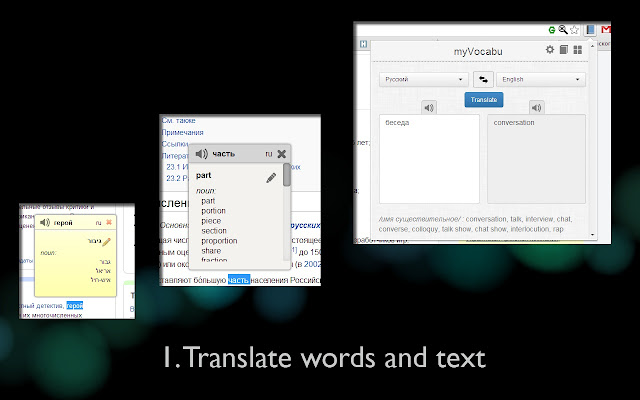
✔ supports translation on 91 languages.
✔ configurable pop-up window and 4 variants of pop-up appearance
✔ showing other variants of translation (verb, noun, adverb, etc.)
✔ remember your translations
✔ 7 types of workouts for words
Please refresh target page or create new one after installation to see how extension works. This extension does not work on local pages and in Chrome store (It is Chrome limitations).
If you used previous version of translator and now it does not work, please restart Chrome.
Release history
2.0.1.0
- Added 19 languages (Hausa, Igbo, Maori, Uzbek, etc.)
- Added "Pronunciation" workout (Chrome only)
- Added ability to move words to new/completed stage (translation page)
- Added score multiplier for workouts
- Auto redirect to Google page with Captcha if translate feature are not working
- Updated design for workouts panel, "Vocabulary cards", "Find the pairs", etc.
- Fixed a number of issues (17″ display, sign '#' in sentence, mixing words in "Find the pairs" workout and others)
Supported languages:
Afrikaans - Afrikaans
Albanian - Shqip
Arabic - اللغة العربية
Armenian - հայեր
Azerbaijani - Azərbaycanca
Basque - Euskara
Belarusian - Беларуская
Bengali - বাংলা
Bosnian - Bosanski
Bulgarian - български език
Catalan - català
Cebuano - Sugboanon
Chichewa - Nyanja
Chinese Simplified - 达伟, 汉语
Chinese Traditional - 古文
Croatian - Hrvatski
Czech - Čeština
Danish - Dansk
Dutch - Nederlands
English - English
Esperanto - Esperanto
Estonian - Eesti
Filipino/Tagalog - Wikang Tagalog
Finnish - Suomi
French - Français
Galician - Galego
Georgian - ქართული
German - Deutsch
Greek - Ελληνικά
Gujarati - Taetae ni Kiribati
Haitian Creole - Kreyòl Ayisyen
Hausa - Yaren Hausa
Hebrew - עברית
Hindi - हिन्दी
Hmong - Tiếng H’Mông
Hungarian - Magyar
Icelandic - Íslenska
Igbo - Asụsụ Igbo
Indonesian - Bahasa Indonesia
Irish - Gaeilge
Italian - Italiano
Japanese - 日本語
Javanese - Basa Jawi
Kannada - ಕನ್ನಡ
Kazakh - Қазақ тілі
Khmer - ភាសាខ្មែរ
Korean - 조선말, 한국어
Lao - ພາສາລາວ
Latin - Latina
Latvian - Latviešu
Lithuanian - Lietuvių
Macedonian - Mакедонски
Malagasy - Malagasy
Malay - Bahasa Melayu
Malayalam - മലയാളം
Maltese - Malti
Maori - Te reo Māori
Marathi - मराठी
Mongolian - Mongɣol kele
Myanmar (Burmese) - myanma bhasa
Nepali - नेपाली भाषा
Norwegian - Norsk
Persian - فارسی
Polish - Język Polski
Portuguese - Português
Punjabi - ਪੰਜਾਬੀ
Romanian - Română
Russian - Русский
Serbian - Српски, Srpski
Sesotho - Sesotho
Sinhalese - සිංහල
Slovak - Slovenčina
Slovenian - Slovenščina
Somali - Af-Soomaali
Spanish - Español
Sundanese - basa Sunda
Swahili - Kiswahili
Swedish - Svensk
Tajik - тоҷикӣ
Tamil - தமிழ்
Telugu - తెలుగు
Thai - ภาษาไทย
Turkish - Türkçe
Ukrainian - Українська
Urdu - ہندوستانی
Uzbek - Oʻzbek tili
Vietnamese - Tiếng Việt
Welsh - Cymraeg
Yiddish - ייִדיש
Yoruba - Yorùbá
Zulu - isiZulu
Why Download myVocabu?
- ✅ Trusted by 6211+ users worldwide
- ✅ High Rating: 4.76/5 stars from 390 reviews
- ✅ Latest Version: 2.1.0.3 - Always up to date
- ✅ Safe & Secure: Verified by Chrome Web Store
- ✅ Free to Use: No cost required
Extension Details
Discover myVocabu - The Best Chrome Extension for Your Browser
Looking for the perfect Chrome extension to enhance your browsing experience? myVocabu is one of the most popular and highly-rated extensions available on the Chrome Web Store, trusted by over 6211 users worldwide.
With an impressive 4.76-star rating based on 390 authentic user reviews, myVocabu has proven its value and reliability to the Chrome community. This extension is perfect for users who want to improve their productivity, enhance their browsing security, or simply add useful functionality to their Chrome browser.
Download myVocabu today and join thousands of satisfied users who have already discovered the benefits of this powerful Chrome extension. Installation is quick and easy - simply click the download button above to be redirected to the official Chrome Web Store where you can safely install this extension in just a few clicks.
Similar extensions