
New Tab Replace
About New Tab Replace
WORKS IN INCOGNITO MODE !!!
LIGHTWEIGHT: Requires no extra memory or background process!
SYNCs settings between machines!
...more features to come :)
-----------------------------------------------------
Sets a user-specified URL to load in new tabs.
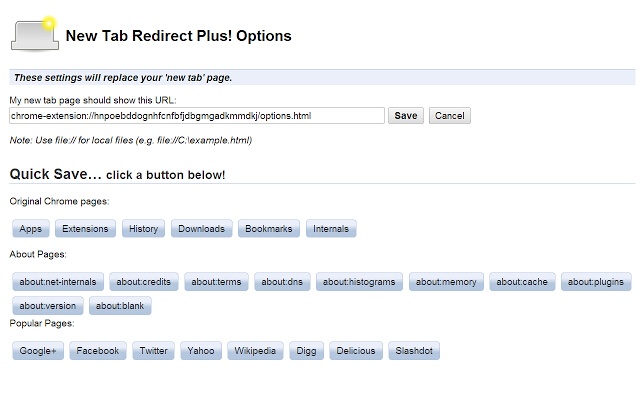
Sets a custom URL to load in new tabs. Choose from chrome's about pages, *NewTab, Extensions, Downloads, History*, a few popular URLs, or provide your own. Your custom tab can also be a local file, allowing you to create your own new tab page. Saving blank text will cause your new tab to be about:blank.
Files can begin with: file:\\, file://, and file:///
Important: This is not meant to replace your homepage, only new tabs. If your browser is set to load the New Tab page as your homepage, there may be odd consequences.
Please visit the developer site link below for changelog or contact information.
*********
Note
*********
I thought I'd explain the lacking highlight of the omnibar in the description instead of in the comments. Google Chrome extensions do not currently have access to interact with the omnibar for highlighting after the new page is created. There is an experimental API to retrieve values and detect user input in the omnibar, but it does not allow extensions to highlight the text. I've tested version 1.0.1 of New Tab Redirect! across numerous developer builds, and the cursor only occasionally ends at the end of the omnibar. However, this is handled by Chrome itself and can not be modified via the extension. As soon as Chrome offers this functionality, I will implement it. Until then, it is possible to use CTRL+L to quickly highlight the omnibar.
Legal Stuff:
I am not affiliated with Google or Google Chrome.
Google Chrome is a registered trademark of Google, Inc.
The 'Popular Pages' are taken from www.alexa.com/topsites. I am in no way affiliated with Google, Facebook, Twitter, Yahoo, Wikipedia, Digg, Delicio.us, Slashdot, MySpace or any other page listed here. These are provided as a convenience to the user of this extension. By using those pages or any others as a replacement for your new tab, you are still bound by any agreement between you and that site or service.
Why Download New Tab Replace?
- ✅ Trusted by 1780+ users worldwide
- ✅ High Rating: 3.88/5 stars from 8 reviews
- ✅ Latest Version: 1.2.2 - Always up to date
- ✅ Safe & Secure: Verified by Chrome Web Store
- ✅ Free to Use: No cost required
Extension Details
Discover New Tab Replace - The Best Chrome Extension for Your Browser
Looking for the perfect Chrome extension to enhance your browsing experience? New Tab Replace is one of the most popular and highly-rated extensions available on the Chrome Web Store, trusted by over 1780 users worldwide.
With an impressive 3.88-star rating based on 8 authentic user reviews, New Tab Replace has proven its value and reliability to the Chrome community. This extension is perfect for users who want to improve their productivity, enhance their browsing security, or simply add useful functionality to their Chrome browser.
Download New Tab Replace today and join thousands of satisfied users who have already discovered the benefits of this powerful Chrome extension. Installation is quick and easy - simply click the download button above to be redirected to the official Chrome Web Store where you can safely install this extension in just a few clicks.
Similar extensions