Text Tools
About Text Tools
Uppercase - converts all characters to upper case
Lowercase - converts all characters to lower case
Count characters - counts all characters in text
Count words - counts words in text
Count lines - counts new lines in text
Rotate 13 - Moves each character with 13 positions forward in the ASCII table
Sort lines alpha - Sorts text lines alphabetically
Character frequency - How many times each character is used
Word frequency - How many times each word is used
Character frequency - How many times each character is used
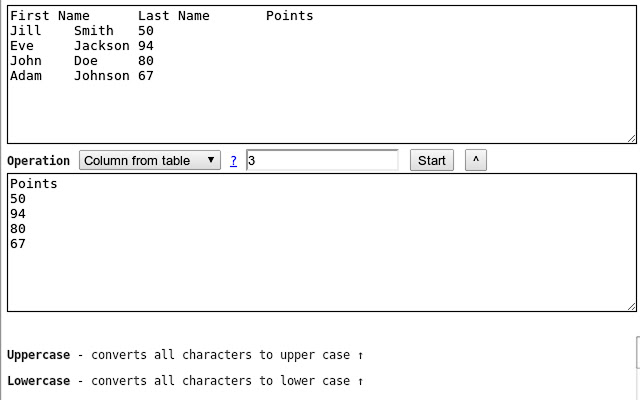
Column from table - Allows you to get text column from HTML table. Copy and paste the table content in the text field and type the column number you want to extract then press Start
Trim lines - Removes whitespace from end of lines
Replace text - Replaces one string with another
Format JSON - Pretty format JSON string
URLEncode - Encode string as URL safe string
URLDecode - Decode URL safe string as regular string
base64encode - Encode text as base64
base64decode - Decode base64 sting
Add line numbers - Add line number before every line of text
Split text - Splits text by separator
Indent lines with spaces - Indents each line with the selected number of spaces
---
CHANGES
1.0.21 - Added Indent lines with spaces; Result is auto-selected after the operation
1.0.20 - Added replace regexp; Added expand template
1.0.19 - Added Remove empty lines
1.0.18 - Removed dependency on jQuery
1.0.17 - Added trim lines start and end as separate commands to trim white-space from the beginning or the end of each line
1.0.16 - Added Remove duplicate lines
1.0.15 - Added case insensitive line sort
1.0.13 - Added shuffle function
1.0.12 - Added underscore and strikeout functions
1.0.11 - Save/Restore last used tool;
1.0.10 - Added auto number formatting;
1.0.9 - Added prefix/suffix to each line function;
1.0.8 - Fixed replace; Added replace with new line;
1.0.7 - Strip (most of) punctuation from word frequency;
1.0.6 - Frequency lists are now sorted
1.0.5 - Added Title Case convert. Your text is populated from the clipboard;
1.0.4 - Added Unix timestamp to date converter;
1.0.3 - Cleaner icon. Removed links from descriptions;
1.0.2 - Small interface improvements;
1.0.1 - Working Trim lines;
Why Download Text Tools?
- ✅ Trusted by 224+ users worldwide
- ✅ High Rating: /5 stars from reviews
- ✅ Latest Version: 1.0.21 - Always up to date
- ✅ Safe & Secure: Verified by Chrome Web Store
- ✅ Free to Use: No cost required
Extension Details
Discover Text Tools - The Best Chrome Extension for Your Browser
Looking for the perfect Chrome extension to enhance your browsing experience? Text Tools is one of the most popular and highly-rated extensions available on the Chrome Web Store, trusted by over 224 users worldwide.
With an impressive -star rating based on authentic user reviews, Text Tools has proven its value and reliability to the Chrome community. This extension is perfect for users who want to improve their productivity, enhance their browsing security, or simply add useful functionality to their Chrome browser.
Download Text Tools today and join thousands of satisfied users who have already discovered the benefits of this powerful Chrome extension. Installation is quick and easy - simply click the download button above to be redirected to the official Chrome Web Store where you can safely install this extension in just a few clicks.
Similar extensions