
Tranquility Reader
About Tranquility Reader
Functionality
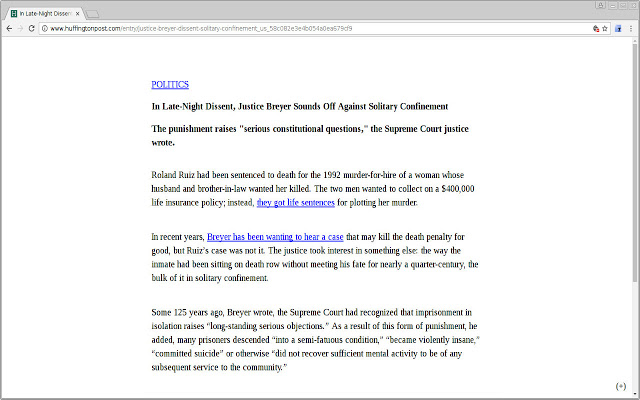
* Click the navigation-bar icon to transform the page on Desktop
Features
* Compatible with NoScript
* Save content offline for reading later (the tranquility view is saved locally on your computer)
* Ability to export/import the offline content.
* Ability to customize default font, font-size, font color, background color, and width of the reading area (you can use https://www.w3schools.com/colors/colors_picker.asp to pick a suitable color code—thanks to user JA for feedback on this!)
* Create and manage your own preset configuration of the various options/preferences
* Add/edit notes/annotations to portions of the offline content; collate annotations with context for a summary of all your notes and annotations.
* Unobtrusive menu at the bottom of the screen (displayed by clicking the (+) symbol on the bottom right corner of the screen) provides additional features
* Additional links are available through a "More Links" button in the menu at the bottom of the screen
* Left-clicking a link in Tranquility View will open the link in Tranquility View in the current tab
* Transform only a portion of the web page by highlighting the text and then running Tranquility (right-click context menu option - "Tranquilize Selection")
License & Copyright:
Tranquility is provided under GPLv3 license.
Copyright (C) 2012-2020 Arun Kunchithapatham
Privacy Policy:
This extension does not collect or transmit any information to an external website. All processing and data storage is local to your browser.
Feedback:
Please send any feedback, bug reports, enhancement requests to the listed support website or leave a review with details in the comment section of this page.
Release Notes are available via the support website listed
Why Download Tranquility Reader?
- ✅ Trusted by 2000+ users worldwide
- ✅ High Rating: /5 stars from reviews
- ✅ Latest Version: 3.0.21 - Always up to date
- ✅ Safe & Secure: Verified by Chrome Web Store
- ✅ Free to Use: No cost required
Extension Details
Discover Tranquility Reader - The Best Chrome Extension for Your Browser
Looking for the perfect Chrome extension to enhance your browsing experience? Tranquility Reader is one of the most popular and highly-rated extensions available on the Chrome Web Store, trusted by over 2000 users worldwide.
With an impressive -star rating based on authentic user reviews, Tranquility Reader has proven its value and reliability to the Chrome community. This extension is perfect for users who want to improve their productivity, enhance their browsing security, or simply add useful functionality to their Chrome browser.
Download Tranquility Reader today and join thousands of satisfied users who have already discovered the benefits of this powerful Chrome extension. Installation is quick and easy - simply click the download button above to be redirected to the official Chrome Web Store where you can safely install this extension in just a few clicks.
Similar extensions


![[refugee_to_president_to_artist_to_heretic] logo](https://lh3.googleusercontent.com/SZZPk_F_X-yXAm0rOY6OTJ4s8KhL0gvEs3bKUFz3647UFc0h7BzlxwCDEx4EzNJk2caSACI_7rC9VbjH_ce8e_yxYQ=w128-h128-e365-rj-sc0x00ffffff)




