Infometer
About Infometer
Typical usage :
You read lengthy in depth articles that are always caught between useless lengthy information like comments or ads. So the scrollbar becomes useless at telling you how much there is left to read in the information that you care about.
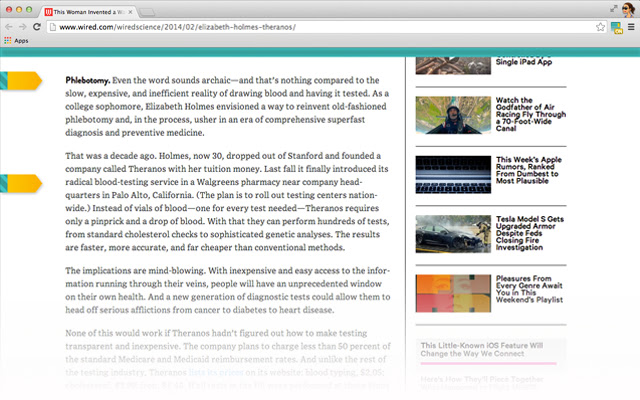
Infometer acts as an information measurer that gives you the same visual clue as the scrollbar about your progress in reading a web page except that you can delimit the specific content to measure.
It will ease your online reading experience as you will read faster and with more focus once you know how much exactly you need to read in a web page.
Features :
★ Gives visual clue like a scrollbar of the progress in a web page except that you delimit the content that is measured.
★ Synces with Chrome Sync. So if you were reading on a computer and had markers set up, if you connect on another computer where chrome is synced, you will have the same thing. It takes 7 seconds to complete a sync cycle.
★ Click on the beginning of the progress bar to find the first marker.
★ Click on the end of the progress bar to find the second marker.
★ The icon has 4 status :
- ON : the extension is active on the current page.
- OFF (grey) : the extension is inactive on the current page.
- OFF (red) : the extension doesn't work on this type of page. Certain pages like the chrome store or the chrome pages don't work with the extension.
- ERR : You should reload the current page to make the extension work again.
How to use it ?
1. Click on its icon like you see in the screenshots and it will add a progress bar and two markers in the current page you're viewing.
2. Click on the markers to place them around the content you want to measure.
3. As you scroll, the progress bar at the top will show how much of the measured content has already been scrolled.
To turn off the progress bar, just click again on the icon.
Why Download Infometer?
- ✅ Trusted by 126+ users worldwide
- ✅ High Rating: /5 stars from reviews
- ✅ Latest Version: 1.0.3 - Always up to date
- ✅ Safe & Secure: Verified by Chrome Web Store
- ✅ Free to Use: No cost required
Extension Details
Discover Infometer - The Best Chrome Extension for Your Browser
Looking for the perfect Chrome extension to enhance your browsing experience? Infometer is one of the most popular and highly-rated extensions available on the Chrome Web Store, trusted by over 126 users worldwide.
With an impressive -star rating based on authentic user reviews, Infometer has proven its value and reliability to the Chrome community. This extension is perfect for users who want to improve their productivity, enhance their browsing security, or simply add useful functionality to their Chrome browser.
Download Infometer today and join thousands of satisfied users who have already discovered the benefits of this powerful Chrome extension. Installation is quick and easy - simply click the download button above to be redirected to the official Chrome Web Store where you can safely install this extension in just a few clicks.
Similar extensions