
TeddyID Password Manager
About TeddyID Password Manager
When you enter a password, TeddyID will offer to encrypt and save it for future use.
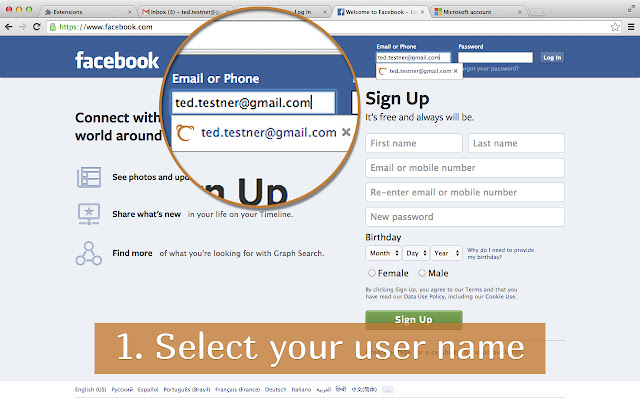
To use this password again, you just select your username/email from the dropdown list, we send a picture to your phone, you make sure the same picture is displayed on your computer, tap "Yes" on your phone, you're logged in.
When you register at a new site, let Teddy ID generate a long secure unbreakable password and let Teddy ID save it. Then log in by selecting your username/email from the list. You don't need to remember, see, or type this password even once.
Teddy ID is more secure than regular Chrome password manager because you confirm your login on your phone. That means, anyone who steals your laptop, won't be able to log in as you, as long as your phone is still with you. This is two factor authentication for every site, even those sites that didn't enable two factor authentication themselves.
Unlike LastPass, 1Password, KeePass, and other earlier password managers, you don't have to remember, nor type, even one password. You tap one button on your phone instead.
You can use saved passwords in other browsers on other computers too. Save once, use everywhere, no manual sync required. Extensions for other browsers (Firefox, Safari, Internet Explorer) are also available.
Your passwords are encrypted/decrypted strictly only on your computer. The encryption key (used to encrypt/decrypt your passwords) is stored strictly only on your computers and your phone. We store only encrypted passwords on our servers and send them to your computer only after we receive a positive response from your phone. Encrypted passwords are useless without the encryption key, so even we can't see your unencrypted passwords.
If your company uses TeddyID, you have the option to save password under your department, then all your colleagues in this department will be able to use this password without even knowing it. More details about TeddyID Enterprise Password Manager at https://www.teddyid.com/enterprise.php.
To use Teddy ID, you need to install a free app on your phone. The app is available for iPhone, Android, Windows Phone, BlackBerry, Nokia Asha, and Java phones.
This extension is free for 30 days. Afterwards, if you liked it and want to continue using, you need to pay $0.99 for your lifetime license for this browser.
Why Download TeddyID Password Manager?
- ✅ Trusted by 132+ users worldwide
- ✅ High Rating: /5 stars from reviews
- ✅ Latest Version: 1.0.28 - Always up to date
- ✅ Safe & Secure: Verified by Chrome Web Store
- ✅ Free to Use: No cost required
Extension Details
Discover TeddyID Password Manager - The Best Chrome Extension for Your Browser
Looking for the perfect Chrome extension to enhance your browsing experience? TeddyID Password Manager is one of the most popular and highly-rated extensions available on the Chrome Web Store, trusted by over 132 users worldwide.
With an impressive -star rating based on authentic user reviews, TeddyID Password Manager has proven its value and reliability to the Chrome community. This extension is perfect for users who want to improve their productivity, enhance their browsing security, or simply add useful functionality to their Chrome browser.
Download TeddyID Password Manager today and join thousands of satisfied users who have already discovered the benefits of this powerful Chrome extension. Installation is quick and easy - simply click the download button above to be redirected to the official Chrome Web Store where you can safely install this extension in just a few clicks.
Similar extensions




