
Delicious Bookmark Bar Sync 1.1
About Delicious Bookmark Bar Sync 1.1
----------------------------
PLEASE: send bug reports to [email protected]. If you use the comment area here in the Chrome App Store for bug reports, we have no way to contact you if we need additional information to fix the bug, and we have no way to remove the comment after the bug has been fixed.
----------------------------
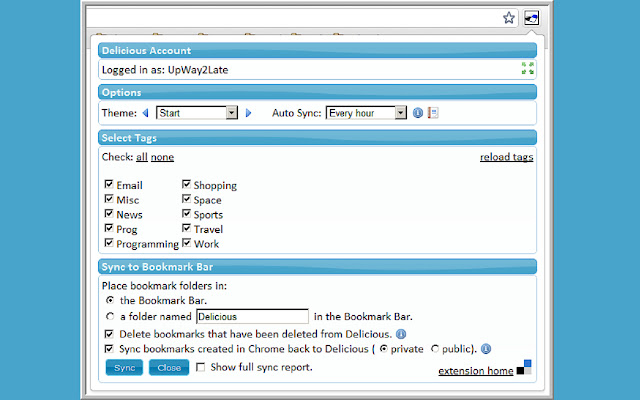
This extension does a one-way (two-way optional), on-demand (auto-sync optional) copy from your Delicious bookmarks to the Google Chrome Bookmark Bar. This is done on a tag by tag basis - you select which tags to copy.
Tags are created as folders on the bookmark bar, and those folders are filled with your Delicious bookmarks.
For two way copying (back to Delicious), just create new bookmarks in the bookmark bar folders (the ones that the extension created) and check the sync back option.
Note: Login via Yahoo ID is not currently supported.
Release 1.0.1 (Version 1.0.1.0) Notes:
1) Fixes login issue related to Chrome 19.x.
Release 1.0 (Version 1.0.0.4) Notes:
1) Bug fixes.
Release 1.0 (Version 1.0.0.1) Notes:
1) Compensated for Delicious API change that caused private bookmarks to not be synched.
2) Added support for when adding an existing Delicious bookmark to a new tag folder in Chrome.
Beta 9.8 (Version 0.9.8.0) Notes:
1) Rolled back the empty tag/folder removal feature because the Delicious API sometimes returns no bookmarks when some do exist. Empty tags selected for syncing will be synched as empty folders. Note that removing folders for deleted tags is still implemented.
2) Added a setting for the maximum number of tag columns (the maximum used to be hardwired at 5).
Beta 9.7 (Version 0.9.7.0) Notes:
1) Added a quick link to Delicious itself.
2) Added support for deleted tags (folders are removed in Chrome).
3) Made the sync-back description text optional.
4) Added option for how long to save a password.
Beta 9.6 (Version 0.9.6.0) Notes:
1) Fixed issue where a bookmark could not appear in 2 different tag folders.
2) Fixed several typos.
Beta 9.5 (Version 0.9.5.0) Notes:
1) Added optional auto-sync (operates anytime Chrome is running).
2) Added background processing of tasks.
3) Fixed bug affecting tags in non-English character sets.
4) Added scroll bar for tags area to improve handling of large numbers of tags.
5) Improved start-up responsiveness in certain login situations.
Beta 9.2 (Version 0.9.2.92) Notes:
1) Fixed error on non-English Chrome versions.
Beta 9.1 (Version 0.9.2.91) Notes:
1) Fixed OSX issues.
2) Fixed a Sync-Back issue.
3) Added selectable themes.
4) Added Pinboard support (released as a separate extension).
Why Download Delicious Bookmark Bar Sync 1.1?
- ✅ Trusted by 1000+ users worldwide
- ✅ High Rating: /5 stars from reviews
- ✅ Latest Version: 1.1.1.2 - Always up to date
- ✅ Safe & Secure: Verified by Chrome Web Store
- ✅ Free to Use: No cost required
Extension Details
Discover Delicious Bookmark Bar Sync 1.1 - The Best Chrome Extension for Your Browser
Looking for the perfect Chrome extension to enhance your browsing experience? Delicious Bookmark Bar Sync 1.1 is one of the most popular and highly-rated extensions available on the Chrome Web Store, trusted by over 1000 users worldwide.
With an impressive -star rating based on authentic user reviews, Delicious Bookmark Bar Sync 1.1 has proven its value and reliability to the Chrome community. This extension is perfect for users who want to improve their productivity, enhance their browsing security, or simply add useful functionality to their Chrome browser.
Download Delicious Bookmark Bar Sync 1.1 today and join thousands of satisfied users who have already discovered the benefits of this powerful Chrome extension. Installation is quick and easy - simply click the download button above to be redirected to the official Chrome Web Store where you can safely install this extension in just a few clicks.
Similar extensions