Virtual Keyboard
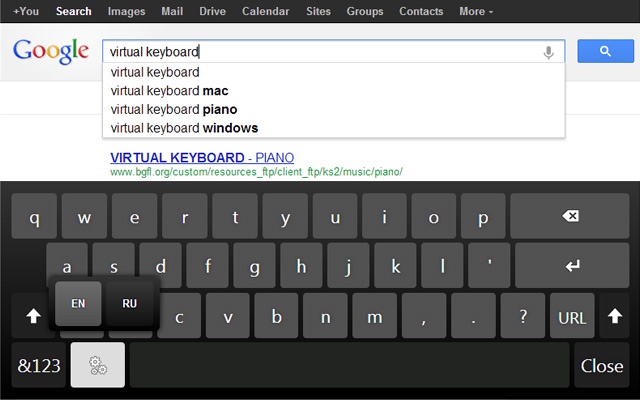
About Virtual Keyboard
https://apps.xontab.com/Suggest/VirtualKeyboard/
Extension Details Page:
http://apps.xontab.com/VirtualKeyboard/
Virtual Keyboard will popup automatically when the user clicks on an input field such as textboxes and textareas. Futhermore, the keyboard will disappear automatically when no longer needed.
This extension is ideal for touch screen devices. This keyboard works like an iOS/Android/Windows 8 touch virtual keyboard.
Version History:
1.12 - Optimisations and minor fixes
1.11.1 - Added Swedish keyboard layout
1.10.9 - MAXLENGTH HTML5 forms feature is now supported
1.10.5 - Added Norwegian keyboard layout
1.10.3 - Added Hungarian keyboard layout
1.10.0 - Added Korean and German keyboard layouts
1.9.15 - Added Tamil 99 keyboard layout
1.9.13 - Added Polish and Spanish keyboard layouts
1.9.10 - Added Slovenian keyboard layout
1.9.6 - Minor fixes, Added "Auto Clicking via Mouse Hover" feature
1.9.0 - Added Hardware acceleration BETA (for faster animations)
This option needs to be enabled from the options page
Added Zoom level
1.8.8 - Bug fix (thanks to Alex)
1.8.3 - Improved touch events support.
1.8.0 - Bug fixes and Improvements thanks to Stuart Wright. Improved enter button, memory usage, keyboard events triggering, small keyboard enhancements and much much more.
1.7.2 - Added a smaller keyboard
1.7.1 - Added AZERTY keyboard layout (Beta)
1.7 - Added basic iframe support
(Note: Cross-domain and wysiwyg are not supported due to security restrictions in Google Chrome)
1.6.1 - Added on-demand mode
1.6 - Added toggle button
1.5.13 - Added underscore button
1.5.4 - Added support to Touch events
1.5.3 - Bug fixes; Migrated to manifest version 2
1.5.0 - Added Russian Keyboard Layout
1.4.7 - Added URL Bar (needs to be enabled from options page)
1.4.6 - Improved UI for various screen sizes
1.4.5 - Fixed Return key in Textareas. Added some features requested on Suggestion page
1.4 - Added number row, Added support to email and number fields
1.0 - Initial Version
Visit http://xontab.com/Apps for more FREE Chrome Extensions
Why Download Virtual Keyboard?
- ✅ Trusted by 700000+ users worldwide
- ✅ High Rating: /5 stars from reviews
- ✅ Latest Version: 1.12.8 - Always up to date
- ✅ Safe & Secure: Verified by Chrome Web Store
- ✅ Free to Use: No cost required
Extension Details
Discover Virtual Keyboard - The Best Chrome Extension for Your Browser
Looking for the perfect Chrome extension to enhance your browsing experience? Virtual Keyboard is one of the most popular and highly-rated extensions available on the Chrome Web Store, trusted by over 700000 users worldwide.
With an impressive -star rating based on authentic user reviews, Virtual Keyboard has proven its value and reliability to the Chrome community. This extension is perfect for users who want to improve their productivity, enhance their browsing security, or simply add useful functionality to their Chrome browser.
Download Virtual Keyboard today and join thousands of satisfied users who have already discovered the benefits of this powerful Chrome extension. Installation is quick and easy - simply click the download button above to be redirected to the official Chrome Web Store where you can safely install this extension in just a few clicks.
Similar extensions