SweDic (Swedish - English Dictionary)
About SweDic (Swedish - English Dictionary)
Swedish - English dictionary extension based on data from the People Dictionary (http://folkets-lexikon.csc.kth.se/folkets/folkets.en.html)
This extension was designed for Swedish/English language learner. It was designed to be like an online dictionary. It was not designed like Google Translate.
Useful features:
- Instant audio player: Normally, when click to play audio in People Dictionary, it is so annoy that it will open a new tap and you have to click the audio again. With this extension, you don't !
- Right click to translate: Yea, you know what it means!
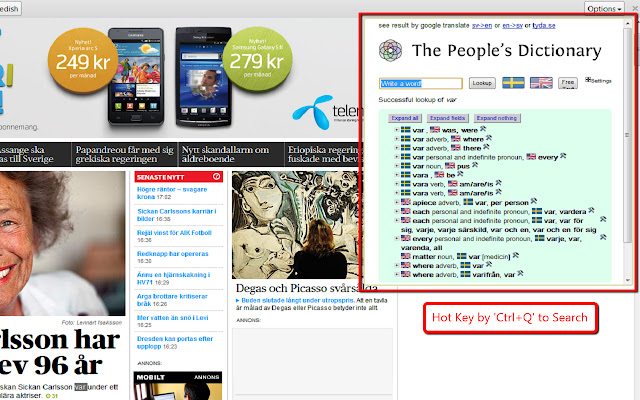
- Translate in same page: You do not have to open the people dictionary in another page and type the words you are looking for. Just type 'Ctrl+Q' or click the extension icon.
- Extra links to Google Translate and Tyda.se
How to use:
- highlight a word
- Ctrl+Q
- a popup will be shown with translation
or
- highlight a word
- right click
- choose 'translate by SweDic'
- a new tab will be shown with translation
or
- highlight a word
- click the extension
- popup will be shown with translation
or
- Ctrl+Q
- popup will be shown
- type a word and enter
or
- click the extension
- popup will be shown
- type a word and enter
Change logs:
version 1.2: fix as require from google
version 1.1.4: fix: some words cannot be found if there is whitespace with the words.
version 1.1.3: add: when search on people dictionary, the extra links to the other dictionaries will be changed.
version 1.1.2: fix: when go to http://folkets-lexikon.csc.kth.se/folkets/folkets.en.html by right click and search for something, it creates a popup.
version 1.1.1: fix: when go to http://folkets-lexikon.csc.kth.se/folkets/folkets.en.html and search for something, it creates a popup.
version 1.1.0: add popup by adding more translators + google anaytic for each action:
version 1.0.0: add css to fix position
: add extra links to Google Translate and Tyda.se
version 0.9.7: add css
version 0.9.5: add css
version 0.9.2: add small description
version 0.9.2: fix: change from Ctrl+Z to Ctrl+Q because Ctrl+Z equals 'undo'
version 0.9.1: fix: The People Dictionary cannot search upper cases in popup.
version 0.9.0: add Ctrl+Z be a hotkey to translate
: remove no-needed areas in popup
: change the old audio to flash audio then no annoy new tab
before be able to click play sound
version 0.2.0: Add 'select word-> click extension -> translate in popup'
version 0.1.1: Fix: The People Dictionary cannot search upper cases.
Why Download SweDic (Swedish - English Dictionary)?
- ✅ Trusted by 1000+ users worldwide
- ✅ High Rating: 4.22/5 stars from 23 reviews
- ✅ Latest Version: 1.2 - Always up to date
- ✅ Safe & Secure: Verified by Chrome Web Store
- ✅ Free to Use: No cost required
Extension Details
Discover SweDic (Swedish - English Dictionary) - The Best Chrome Extension for Your Browser
Looking for the perfect Chrome extension to enhance your browsing experience? SweDic (Swedish - English Dictionary) is one of the most popular and highly-rated extensions available on the Chrome Web Store, trusted by over 1000 users worldwide.
With an impressive 4.22-star rating based on 23 authentic user reviews, SweDic (Swedish - English Dictionary) has proven its value and reliability to the Chrome community. This extension is perfect for users who want to improve their productivity, enhance their browsing security, or simply add useful functionality to their Chrome browser.
Download SweDic (Swedish - English Dictionary) today and join thousands of satisfied users who have already discovered the benefits of this powerful Chrome extension. Installation is quick and easy - simply click the download button above to be redirected to the official Chrome Web Store where you can safely install this extension in just a few clicks.
Similar extensions