Blitz Full Screen URL Launcher
About Blitz Full Screen URL Launcher
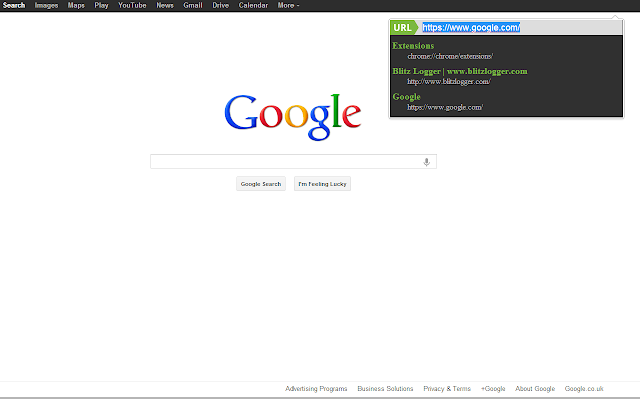
A very simple extension for full screen browsing letting you
- easily navigate between tabs
- easily navigate to a new URL by typing it in the box (enter to navigate in the current tab or shift+enter to open in a new tab)
- close tabs by ctrl+clicking in the list
- search Google like you would in the Omnibox address bar, or type "d?" to get a duckduckgo search.
Any issues please ask a question in the forum (bottom of the page) at http://www.blitzlogger.com/blitz-chrome-url-extension.html or @wlhart on twitter. If you just place a review on here with an issue I can't contact you to help out!
** INSTRUCTIONS **
In Chrome v22 or greater bind the extension to a key once installed by navigating to chrome://extensions, scrolling down the bottom and looking for the link "Configure Commands". When in full screen mode you can then hit your keyboard shortcut, type your URL and hit enter. You can also click on a tab name to switch tabs, or ctrl+click to close it.
This plugin doesn't collect any data and there are no analytics attached either. You can view the source at https://github.com/will-hart/blitz_fullscreen_chrome_extension and a tutorial of how and why the plugin was built at http://www.blitzlogger.com
**CHANGES**
Version 1.2.4:
+ Modified searching to match the Omnibox
+ Existing search syntax still supported - i.e. using "?", "g?" or "d?" prefix
Version 1.2.3:
+ Shift+Enter in text box to open a new tab at URL
+ Ctrl+Click on a tab to close it
Version 1.2.2:
+ Active tab is highlighted
+ Also search google by typing `?`
+ Restyled
Version 1.2.1:
+ Search google by typing `g?` and then a search query
+ Search duck duck go by typing `d?` and then a search query
Version 1.2:
- Removed "go" button, just hit enter to navigate
+ Added a clickable list of tabs to the plugin so you never have to leave fullscreen!
+ Restyled a bit to make it slightly prettier
Version 1.1:
+ Show current URL in the link box
+ Add "http://" to start of URL if not present to allow typing "google.com" into the address bar
Why Download Blitz Full Screen URL Launcher?
- ✅ Trusted by 1101+ users worldwide
- ✅ High Rating: 4.26/5 stars from 35 reviews
- ✅ Latest Version: 1.2.4 - Always up to date
- ✅ Safe & Secure: Verified by Chrome Web Store
- ✅ Free to Use: No cost required
Extension Details
Discover Blitz Full Screen URL Launcher - The Best Chrome Extension for Your Browser
Looking for the perfect Chrome extension to enhance your browsing experience? Blitz Full Screen URL Launcher is one of the most popular and highly-rated extensions available on the Chrome Web Store, trusted by over 1101 users worldwide.
With an impressive 4.26-star rating based on 35 authentic user reviews, Blitz Full Screen URL Launcher has proven its value and reliability to the Chrome community. This extension is perfect for users who want to improve their productivity, enhance their browsing security, or simply add useful functionality to their Chrome browser.
Download Blitz Full Screen URL Launcher today and join thousands of satisfied users who have already discovered the benefits of this powerful Chrome extension. Installation is quick and easy - simply click the download button above to be redirected to the official Chrome Web Store where you can safely install this extension in just a few clicks.
Similar extensions


![QZONE官方网址直达扩展版-[qzone.qq.com] logo](https://lh3.googleusercontent.com/FPscQkaYQSAdm_F1a2egOQ04uXrzbFSB9gFQyVKdzLb3kAxg3LJywxwMgkKlrJ6hnwizjfJAcBuvMg8eXLTE5JRD04c=w128-h128-e365-rj-sc0x00ffffff)