
Checkvist Web Clipper
About Checkvist Web Clipper
A free account comes with unlimited lists and sharing. Write a book, do research, plan a project release.
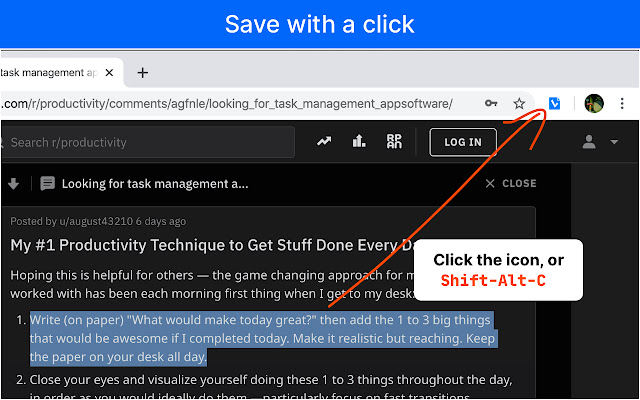
COLLECT ANYTHING WITH ONE CLICK
Found something on the web you want to work on later? Click the Checvkist Clipper icon in the browser toolbar.
KEYBOARD FRIENDLY
Press Shift-Alt-c to invoke the Web Clipper without touching your mouse. Save a clipping with Ctrl-Enter, save and open with Ctrl-Shift-Enter.
ORGANIZE IMMEDIATELY
No 'Inbox' clutter. Select a specific destination, add tags right in the Web Clipper's window. New in version 2.1 - use autocompletion for tags, due dates and assignees.
TURN YOUR CLIPPINGS INTO TASKS
Set due dates to follow up later, create sub-tasks, and delegate to other people. Set priorities, track progress.
SHARE AND COLLABORATE
Share, export or publish online, track progress, all with a free account.
GMAIL AND ISSUE TRACKER INTEGRATION
Add emails, support tickets, or issues as tasks. Pre-select the text to add it as a note. Collect issues from different support systems to plan your work. At the end of the day, you'll have one composite 'done' list from all your web apps.
Use Checkvist as your list-making tool, take your lists with you on any device, desktop or mobile.
Questions or problems? We are at @checkvist_news or https://discuss.checkvist.com
RECENT UPDATES
v 2.3.2
- Make 'Ctrl+Enter' label clickable
v 2.3.1
- Security improvement, update of the used DOMPurify library
v. 2.3
- Remember last selected parent list item
- new option - add to the bottom of the list
- new control to swap note/list item text
v. 2.2.1
- Fix bug with due date completion from keyboard
v. 2.2
- Add integration with ZenDesk, GitLab issues, JetBrains Space Issues/code reviews
v. 2.1
- Automatic completion for tags, due dates, and assignees.
- An option to 'Keep the notes field open'.
- Web Clipper now works also when the “Block third-party cookies” option is enabled in Chrome.
Why Download Checkvist Web Clipper?
- ✅ Trusted by 945+ users worldwide
- ✅ High Rating: /5 stars from reviews
- ✅ Latest Version: 2.3.2 - Always up to date
- ✅ Safe & Secure: Verified by Chrome Web Store
- ✅ Free to Use: No cost required
Extension Details
Discover Checkvist Web Clipper - The Best Chrome Extension for Your Browser
Looking for the perfect Chrome extension to enhance your browsing experience? Checkvist Web Clipper is one of the most popular and highly-rated extensions available on the Chrome Web Store, trusted by over 945 users worldwide.
With an impressive -star rating based on authentic user reviews, Checkvist Web Clipper has proven its value and reliability to the Chrome community. This extension is perfect for users who want to improve their productivity, enhance their browsing security, or simply add useful functionality to their Chrome browser.
Download Checkvist Web Clipper today and join thousands of satisfied users who have already discovered the benefits of this powerful Chrome extension. Installation is quick and easy - simply click the download button above to be redirected to the official Chrome Web Store where you can safely install this extension in just a few clicks.
Similar extensions